
Mapping My AI Harness
Over the last seven months I’ve been building a startup, and our AI harness grew with it. Skills, agent definitions, slash commands, MCP servers. What started as a handful of files under .claude/ turned into something I could no longer hold in my head.
Once a month I sit down and clean it up. Cut the skills nobody calls. Simplify the ones that drifted. Rewrite agent identities that got too vague. Normal gardening.
This month I wanted a different view. Not a list of what I have, I already have that. I wanted a picture of how it all connects. Which skills hand off to which. Which agents get delegated to. Which MCP servers actually get used, and by what.
So I asked Claude to build it. The team liked the result enough that I packaged it into a skill you can drop into any repo. It’s called harness-map, and it runs under Claude Code, Codex, and anything else that reads the Agent Skills format.
How it works
The hard part is not listing the files. A script can walk .claude/ and find every skill, command, agent, and MCP server in a second. The hard part is the edges. A dependency between two skills lives in prose, in a sentence like “then run the code-review skill” buried in a SKILL.md body. You can’t grep your way to that reliably.
So harness-map splits the work. Deterministic scripts do the scanning and the final HTML rendering. In between, the agent reads every skill and agent body and infers the typed edges: skill hands off to skill, skill delegates to agent, either one uses an MCP server.
The one rule I care about most: every edge needs a quotable line of evidence. No line, no edge. That keeps the map honest. It draws what the files actually say, not what sounds plausible.
Output is a single self-contained harness-map.html. Fully offline, opens in any browser.
Reverse-engineering superpowers
The map below is not our harness. That one stays private. This is Obra’s superpowers, a public skill library, run through harness-map. I use superpowers myself for brainstorming, TDD, and debugging, so it made a good test.
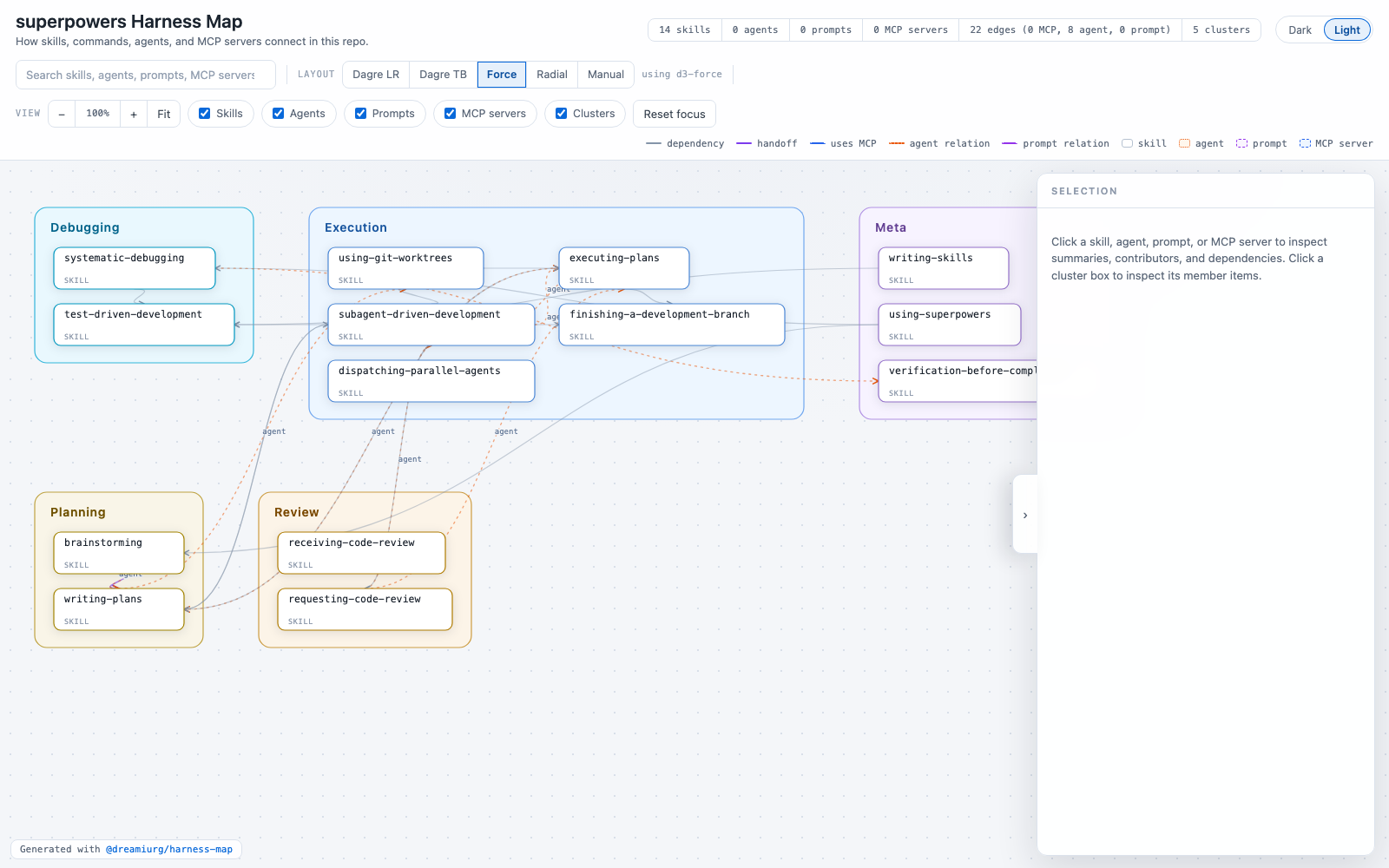
Fourteen skills, twenty-two edges, clustered automatically. You can see which skills sit at the center and which hang off the edge. This took a few minutes to generate from a repo I’d never opened.
Why I keep opening it
There are two reasons I keep opening it. First, if you have a big harness, it’s satisfying to see what’s inside. Seven months of small decisions, each one made in isolation, laid out as one graph. I built most of these skills one friction point at a time and never once saw them together.
Second, and this is the useful part, the layout surfaces problems you can’t feel from inside individual files, because structure you didn’t intend shows up as shape.
What it found in ours
The thing that caught my eye was absence. Several skills I expected to lean on each other had no edges between them at all. They sat in their own corners, disconnected.
I dug in. It turned out the code review instructions were copy-pasted across half a dozen skills. Each skill carried its own slightly-drifted version of the same review steps, instead of every skill pointing at one canonical review skill that already existed. No edges, because there were no references. Just duplication.
That is exactly the kind of thing that hides in plain sight. Each skill reads fine on its own. You only notice when you see them next to each other and the arrows that should be there aren’t. The fix was boring: delete the copies, point everything at the canonical skill. But I would not have found it without the picture.
Try it
npx skills add dreamiurg/harness-map
Then invoke /harness-map, or just ask your agent to map the harness. You get harness-map.html and nothing else to clean up.
Your mileage will vary. Your harness is not my harness, and you may find nothing worth fixing. But if yours has grown past the point where you can hold it in your head, it’s worth a look. It’s been genuinely useful for us.
Cheers.
Comments