
iTerm2 Badges for Claude Code: Know Which Repo You’re In
I wrote about session topic summaries a month ago. That plugin generates a one-liner describing what each Claude Code session is doing and sticks it in the tmux status line. It works. I still use it.
But there’s a simpler question I need answered faster: which repo is this?
When I have four or five Claude sessions open across different projects, the session topic tells me what I’m doing but not where. I kept glancing at tmux panes, reading the topic, then mentally mapping it back to a repository. That’s one step too many.
The fix: a tiny .zshrc wrapper
iTerm2 badges are large, faded text rendered in the background of a terminal session. They’re designed to be visible at a glance without interfering with the actual terminal content.
Here’s what it looks like when the badge is set to the repo name:
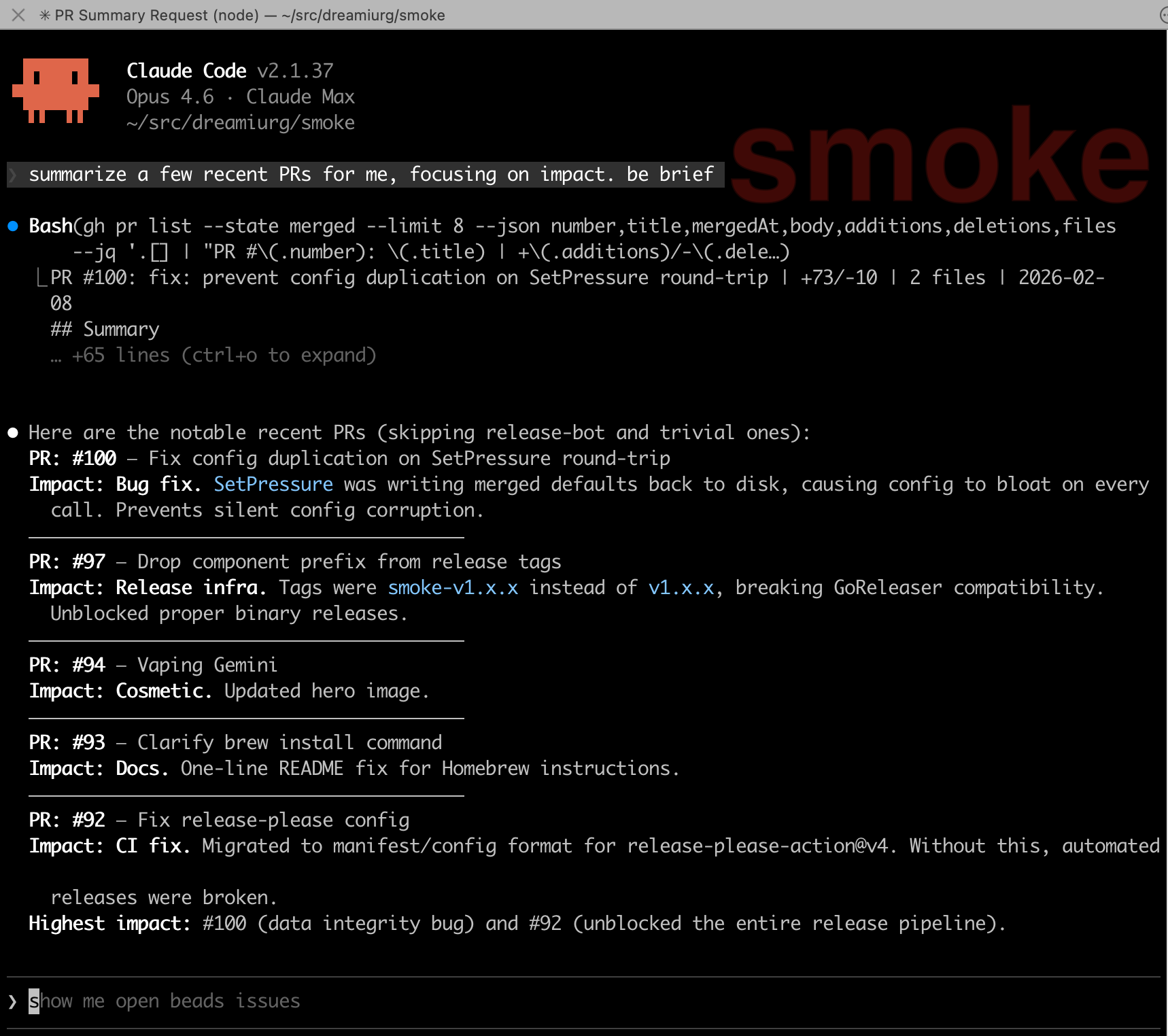
I wrapped the claude command in a shell function that sets the badge to the repository name before launching, and clears it on exit:
# Wrap claude to set/clear iTerm2 badge with repo name
claude() {
  local repo
  repo=$(basename "$(git rev-parse --show-toplevel 2>/dev/null)")
  if [ -n "$repo" ]; then
    printf "\033]1337;SetBadgeFormat=%s\007" "$(printf '%s' "$repo" | base64)"
  fi
  command claude "$@"
  printf "\033]1337;SetBadgeFormat=\007"
}
That’s it. No plugin, no hook, no background process. Just a shell function.
How it works
git rev-parse --show-toplevelfinds the root of the current repositorybasenameextracts just the directory name (e.g.,my-apifrom/Users/me/src/my-api)- The iTerm2 proprietary escape sequence
\033]1337;SetBadgeFormat=...\007sets the badge, with the text base64-encoded as iTerm2 requires command claude "$@"runs the realclaudebinary, passing all arguments through- When Claude exits, the badge is cleared with an empty
SetBadgeFormat
If you’re not in a git repo, no badge is set. No errors, no fallback text, just a clean terminal.
I also alias it for convenience:
alias c='claude'
Why badges over session topics
Session topics and badges solve different problems. I use both.
Session topics tell you what you’re working on: “OAuth debug: fixing schema validation.” They update as the conversation evolves, require a plugin, and take a few seconds to generate via Haiku. Good for remembering context after stepping away.
Badges tell you where you are: “my-api.” They’re instant, static for the lifetime of the session, and need zero infrastructure. Good for glancing across multiple terminal tabs and knowing which is which.
The badge is always there, always correct, and costs nothing. When I’m switching between tabs, that’s what I need first. The topic is what I read second, after I’ve landed in the right place.
iTerm2 badge configuration
Badges are customizable in iTerm2 preferences under Profiles > General > Badge. You can control the font size, position, and maximum dimensions. I keep mine at the default position (top right) with a large enough font to read from across the desk.
If you use tmux integration mode (tmux -CC), badges work per-tab since each tmux window maps to an iTerm2 tab. I wrote about that setup in my remote Claude Code post.
Limitations
This only works in iTerm2. If you use a different terminal, you’ll need to find the equivalent escape sequence (or just ignore this post).
The badge shows the repo name, not the branch. I considered adding the branch but decided against it. The repo name is stable for the session. The branch can change mid-session, and updating it would require either polling or a more complex hook. Not worth it for the 80% case.
If you launch Claude outside a git repository, there’s no badge. I don’t have a use case for that, so I didn’t add a fallback.
Related: I wrote about session topic summaries for Claude Code and running Claude Code remotely from my phone, both of which layer on top of iTerm2 and tmux.
Comments