
I Built an MCP Server for Mountaineers.org
I’ve been a member of The Mountaineers for a few years now. I’ve taken a few courses, climbed a few peaks, gone on a bunch of activities, and made a few friends.
At some point I also started building little tools around the site: a Chrome extension that syncs my activity history, a CLI for PeakBagger, and a Claude Code plugin that pulls route beta from a few places. Same itch every time: I want the data without clicking through five tabs.
The missing piece was letting an AI assistant query mountaineers.org directly. A lot of that site is public for anyone to browse. MCP just turns those pages into structured results so Claude/Codex can answer questions like “what scrambles are on the calendar?”
If you’re a Mountaineers member, the same idea gets more useful: you can ask about your own registrations, activity history, and course enrollments.

Getting to a working prototype
I skimmed the Model Context Protocol spec, looked at mountaineers.org, and thought: it’s mostly HTML. I can parse it, wrap it as MCP tools, and call it done.
That part did go quickly, mostly because I didn’t do it alone. I built it with a lot of help from Claude Code and Codex, and it stayed fun the whole time. I had a usable prototype in TypeScript the same day, published it on npm, and had it answering questions in Claude Desktop.
The slow part was all the small, undocumented details. The site runs on Plone, and a bunch of the “API-shaped” surfaces aren’t APIs at all:
- Faceted search returns HTML fragments, not JSON.
- “My Activities” is a React component with JSON stuffed into a
data-propsattribute. - Logging in means grabbing a CSRF token from a page and then POSTing it back.
I wasn’t expecting any of this to be documented. It was mostly poking around in DevTools, trying a few requests, and seeing what broke. I also borrowed patterns from the Chrome extension.
What It Can Do
Right now it’s split into public tools (no login) and authenticated tools (your account).
Public tools:
- Search activities by type, branch, difficulty, date
- Search courses, trip reports, and routes
- Get full details for any activity, course, trip report, or route
Authenticated tools:
- Your upcoming activities and course enrollments
- Completed activity history with filtering
- Earned badges and certifications
- Member profiles and activity rosters
The public tools are basically a convenience layer over information anyone can see on the website. The authenticated tools are where the personal stuff lives.
Example Session
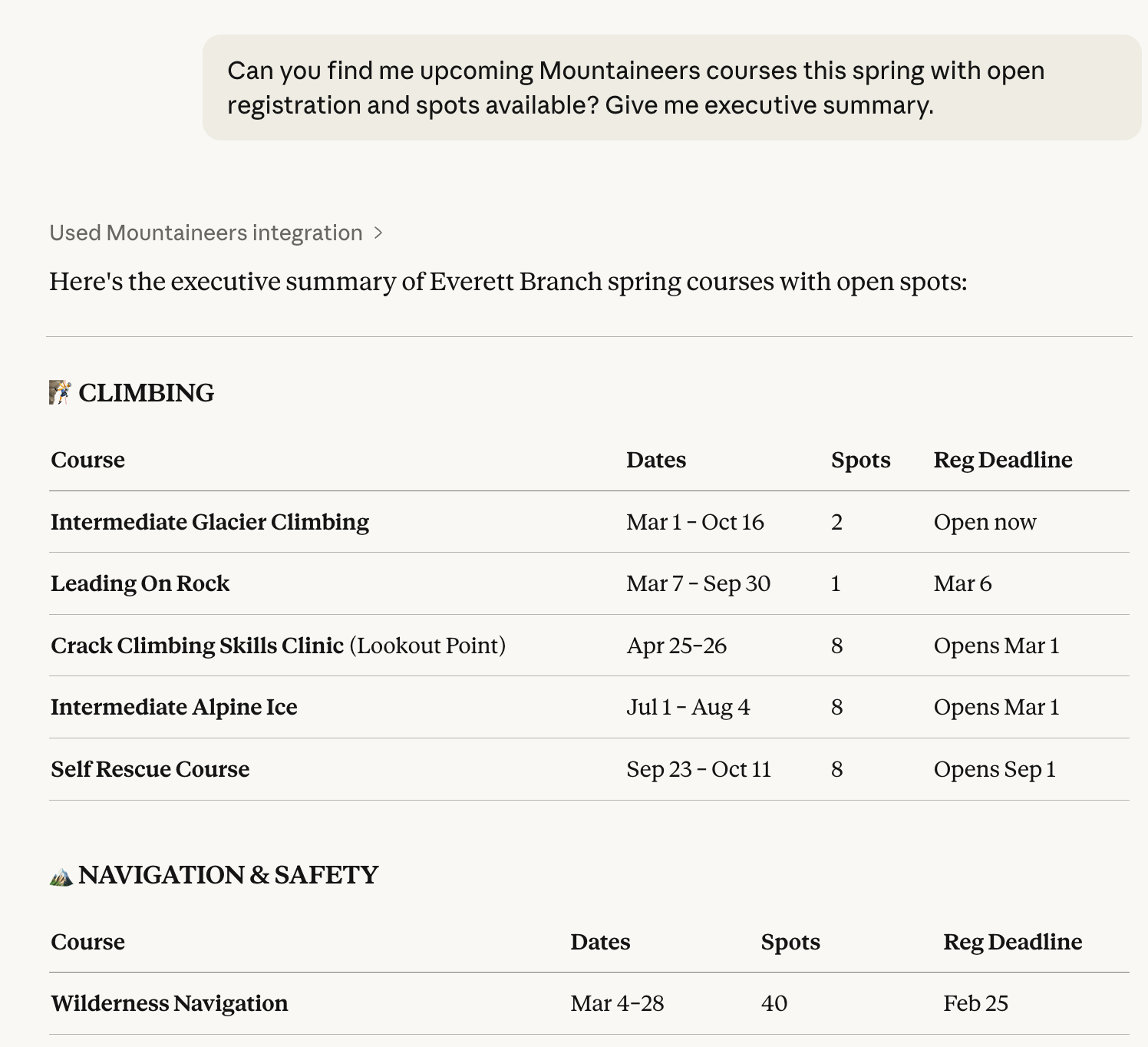
Two real screenshots from Claude Desktop:
Upcoming courses with open spots
One activity, with the details pulled into a single view
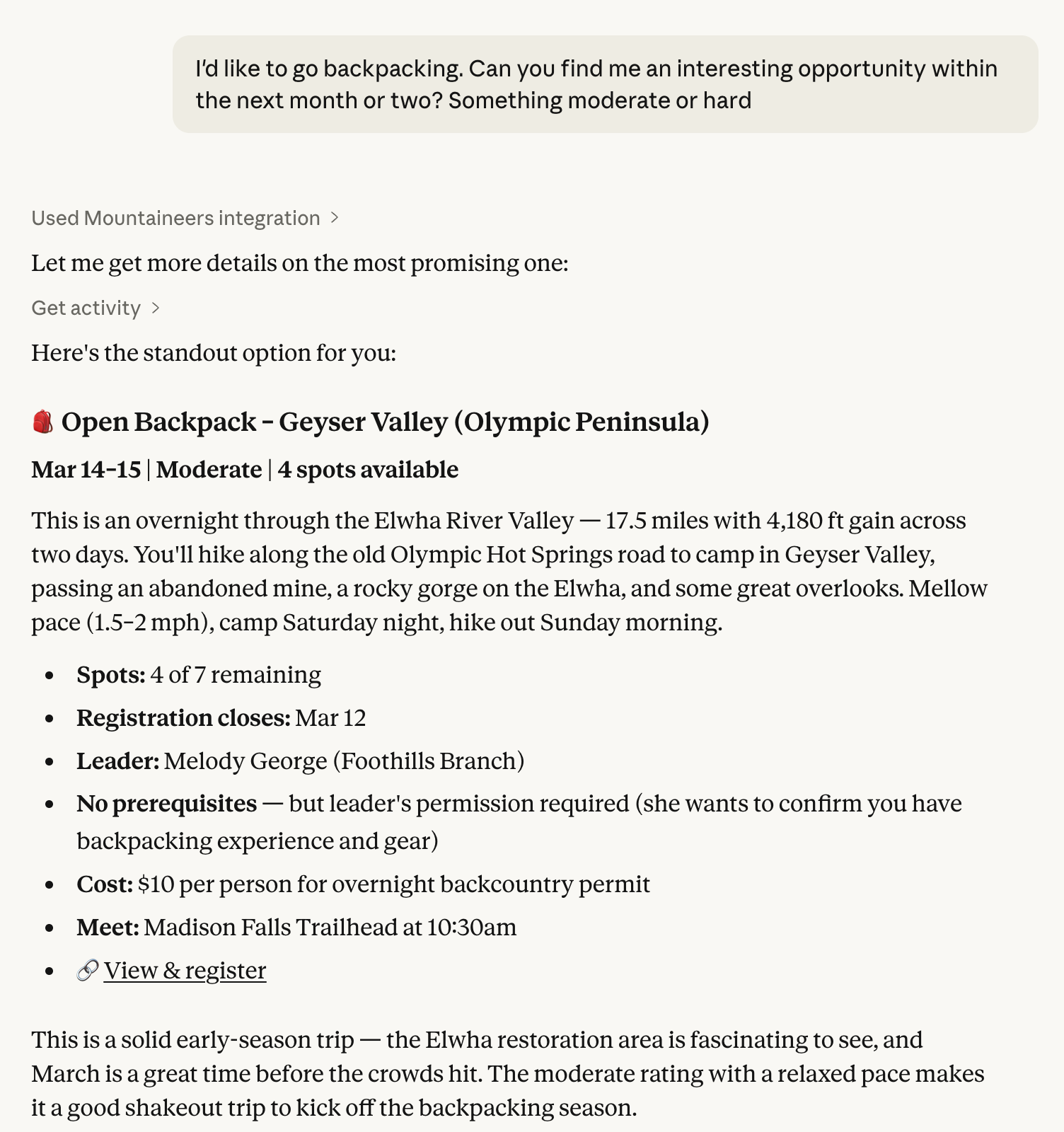
No clicking around. No manually redoing the same filters.
The first cut was messy
The first version was useful but rough:
- Some list tools returned bare arrays, so the client couldn’t tell when results were truncated.
- Some detail pages had fields I wasn’t extracting yet.
- Filters were inconsistent across endpoints.
I pushed a cleanup pass here: ListResult<T> wrappers for truncation, multi-leader extraction for activities, structured date parsing for courses, plus more filters across the list tools. That work is in this PR.
At one point I kept asking Claude to “do better,” and it responded by writing 200+ tests. Turns out HTML parsing breaks in quiet ways. One template tweak can turn “works fine” into “returns an empty list” and you don’t notice until you ask at the wrong time.
Using it
If you want to use it, it works in Claude Desktop, Claude Code CLI, and Codex CLI. The README has the current install/run instructions:
You can’t use it in ChatGPT Desktop without hosting infrastructure that runs the server and proxies a logged-in session to mountaineers.org. That would mean building something that can see your credentials. I don’t want to ship that.
Your credentials stay on your machine and are only sent to mountaineers.org. Nothing goes to any AI provider.
If you find bugs or want features, open an issue.
Related: This is part of a series of mountaineering tools I’ve been building. I wrote about building my first Claude Code skill and how AI agents are changing where the actual work happens.
Cheers.
Comments