
Session Topic Summaries in Claude Code Status Line
A couple of months ago I realized I run way too many parallel Claude Code sessions.
Some are rapid-fire sessions where I’m iterating on code quickly. Others are slow burners that sit around for days while I context-switch to other work. The problem: when you come back to one of those slow sessions, you get that familiar moment of staring at the transcript thinking, what was I doing here again?
Claude Code doesn’t help. There’s no at-a-glance “this session is about X” indicator. You end up scrolling up, re-reading, trying to reconstruct context like you’re debugging your own brain.
So I built a thing.
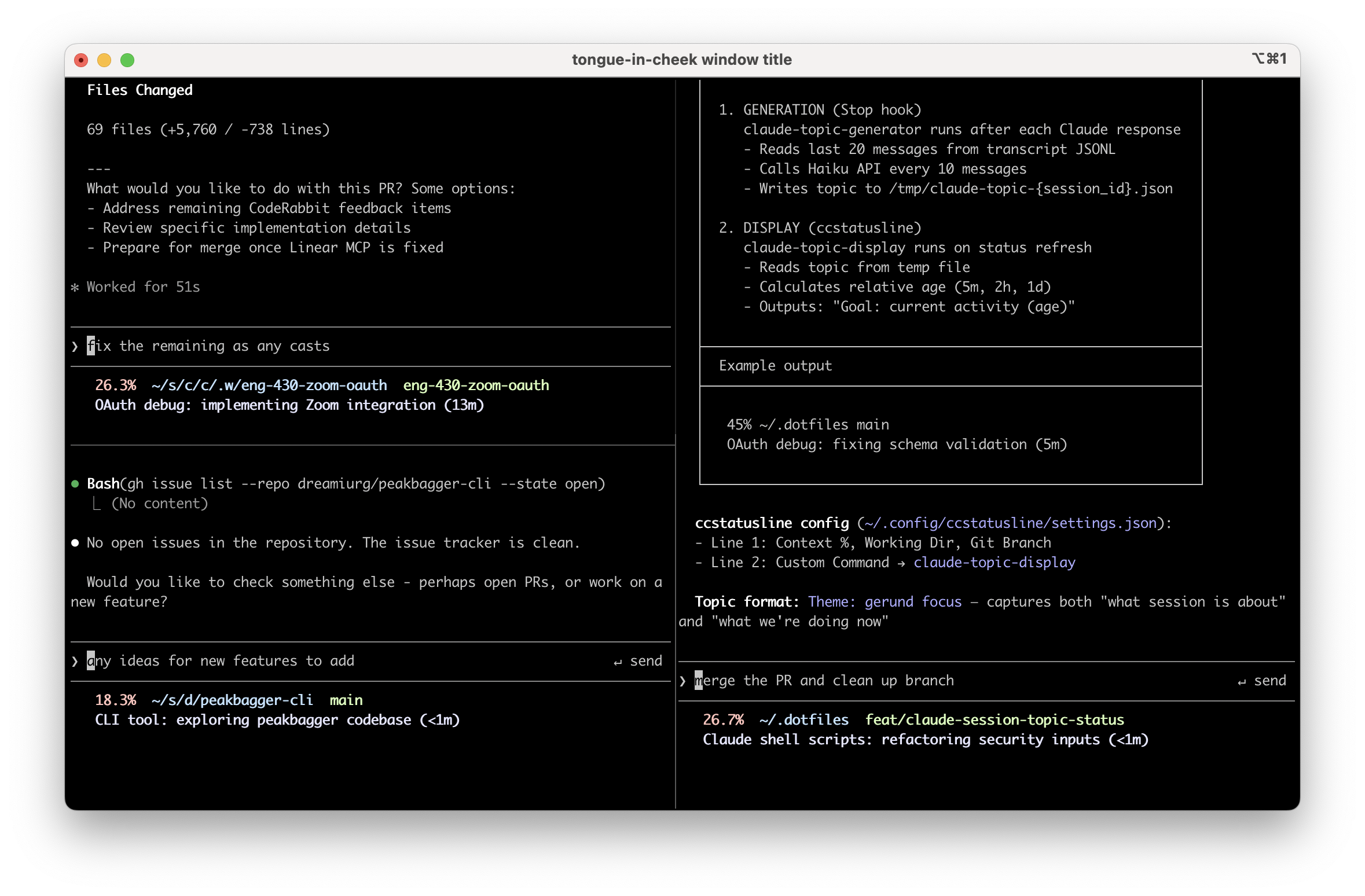
The idea
Put a one-line topic summary in the status line for each session. Keep it fresh automatically. Think Slack or Discord channel topics, or the old IRC topic line, but for Claude Code sessions.
Example lines:
OAuth debug: fixing schema validation (5m)Blog post: adding code snippets (2h)tmux config: wiring session display (<1m)
The summary has two parts:
- Theme - what is this session fundamentally about
- Current focus - what we’re doing right now
Plus a relative timestamp so you can see whether the summary is stale. If it says (2h), it might not reflect the last few messages.
Implementation
It’s mostly glue around Claude Code’s hooks system:
- The Stop hook fires on every message
- I throttle actual generation to every 10 messages, because empirically session themes stay stable across 40-50 messages while focus shifts every 8-10
- When the threshold hits, it spawns a background job that reads the session transcript (JSONL), extracts recent context, and calls Claude Haiku via the
claudeCLI - The hook returns quickly (tens of ms) so Claude Code stays snappy, while summary generation happens async
- A lock file prevents multiple generations from running at once
Things I learned
Along the way I discovered a few annoying but useful things.
Summary generation can take 10-60 seconds depending on transcript size and complexity. You really don’t want it blocking the hook.
The claude CLI has overhead you don’t need for this use case. Turning off session persistence with --no-session-persistence and disabling tools with --tools "" helps.
Haiku occasionally ignores formatting instructions unless you’re very explicit. “Output ONLY the topic line” and “Do NOT output the word ‘Theme’ literally” got me to 100% format compliance.
If you go full set -euo pipefail in a script that renders your status line, you’ll eventually get a useless exit 1 in your UI instead of a fallback message. Ask me how I know.
The plugin
I packaged this as claude-session-topics. The plugin registers the Stop hook automatically. Run /setup-statusline to configure your status line display.
Anyway, if you’re the kind of person who keeps multiple Claude Code sessions open and hates reloading context by scrolling, give it a shot. I also wrote about running Claude Code remotely from my phone and building a daily summary skill, both of which build on the same hooks system.
Comments