Games for your round screenІгри для круглого екрана
Small games my kids and I made for a round touchscreen, and how to put them on one yourself. All you need is the board, a USB-C cable and Chrome.
Маленькі ігри, які ми з дітьми зробили для круглого сенсорного екрана, і як записати їх на такий самий. Потрібні лише плата, кабель USB-C і Chrome.
GamesІгри
Porthole (Pets Club)
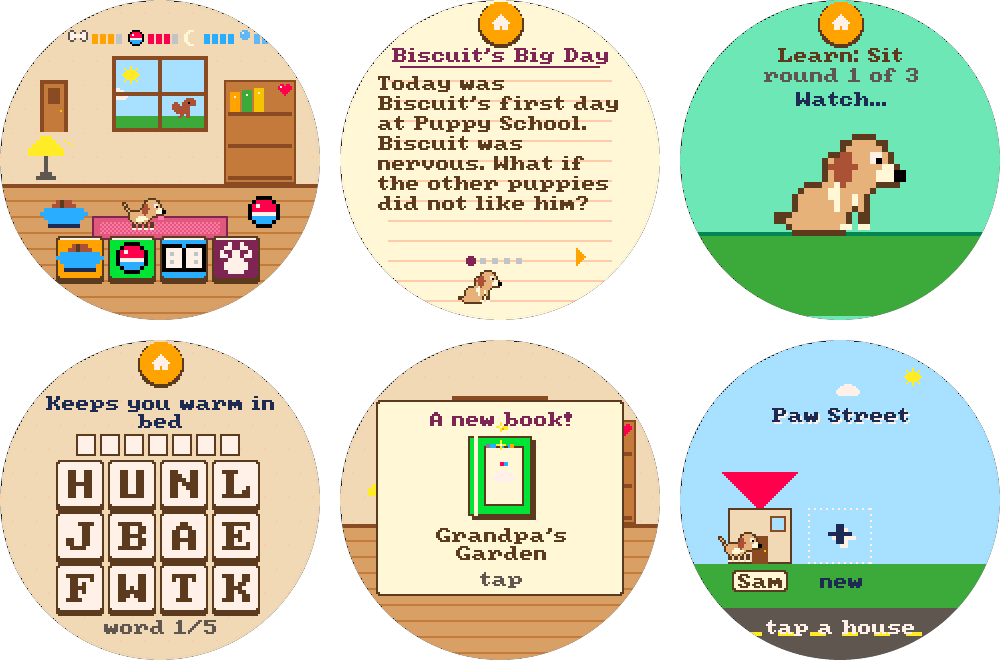
A launcher with a profile for each kid (up to four), and its first game, Pets Club: a pixel puppy that grows over real days, learns tricks and loves being read to. Each kid gets their own pup and a house on Paw Street.Лаунчер із профілем для кожної дитини (до чотирьох) і перша гра в ньому, Pets Club: піксельне цуценя, яке росте з кожним справжнім днем, вчить трюки й любить, коли йому читають. У кожної дитини своє цуценя і свій будиночок на Paw Street.
File to download:Файл для запису:porthole-<version>-factory.bin
Biscuit
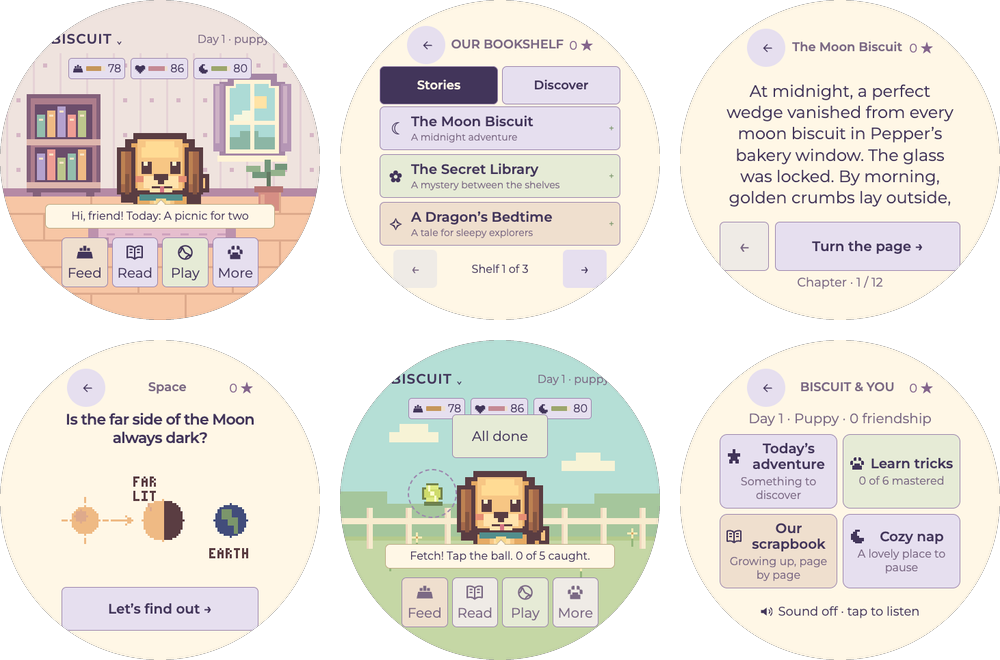
A little dog with a big bookshelf: branching mysteries, 96 illustrated discoveries, tricks and daily adventures. For strong young readers.Маленький песик із великою книжковою поличкою: розгалужені детективні історії, 96 ілюстрованих відкриттів, трюки й щоденні пригоди. Для дітей, які вже добре читають.
File to download:Файл для запису:biscuit-<version>-factory.bin
The boardПлата
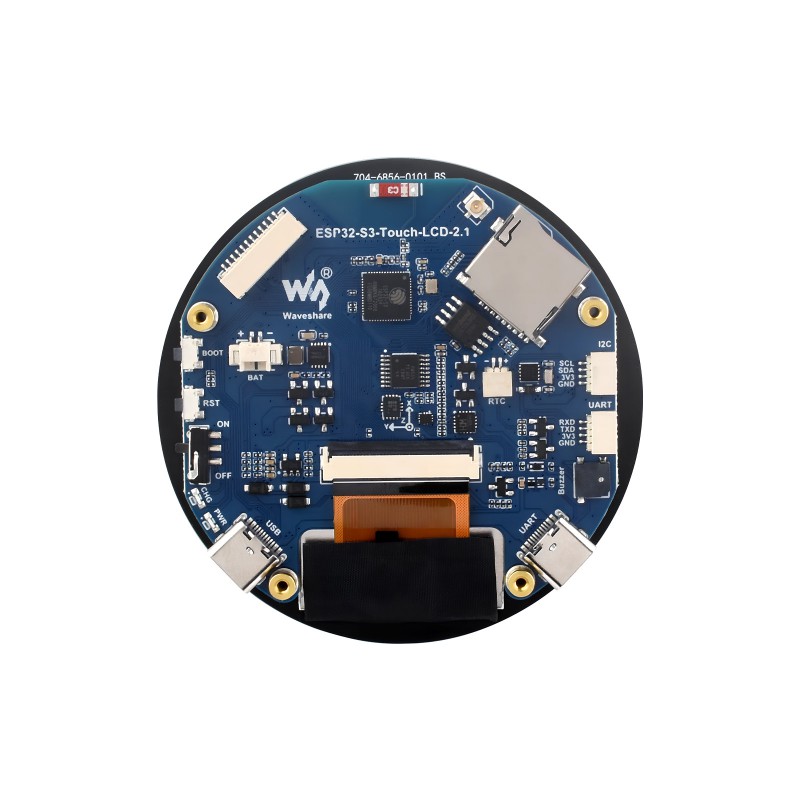
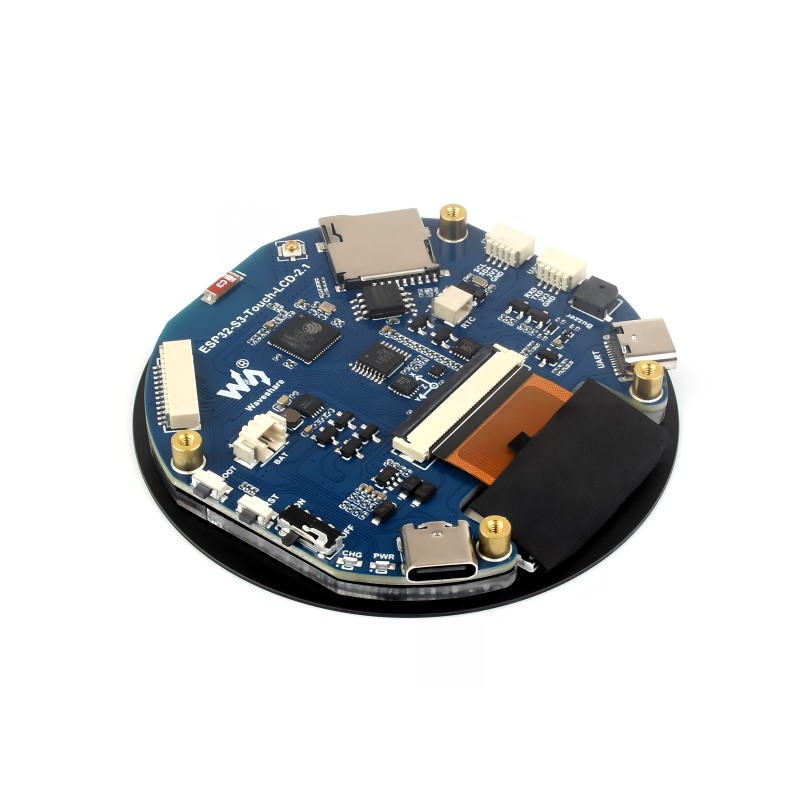
Every game here runs on one board, and only this one is supported: the Waveshare ESP32-S3-Touch-LCD-2.1, the version with the flat 2.1-inch round screen. It's a round touchscreen with a small computer behind it. In a 3D-printed case it becomes a pocket gadget with no buttons at all.Усі ігри тут працюють на одній платі, і підтримується лише вона: Waveshare ESP32-S3-Touch-LCD-2.1, версія з пласким круглим екраном 2,1 дюйма. Це круглий сенсорний екран із маленьким комп’ютером позаду. У надрукованому на 3D-принтері корпусі він стає кишеньковою іграшкою зовсім без кнопок.
Watch out for look-alikes. Waveshare also sells round boards in 1.28, 1.85 and 2.8 inch, and those won't run these games. The 2.1B has curved glass over the same screen; nobody has tried the games on it yet.Остерігайтеся схожих плат. Waveshare продає й круглі плати на 1,28, 1,85 і 2,8 дюйма, і на них ці ігри не запрацюють. У 2.1B вигнуте скло над тим самим екраном; ігри на ній ще ніхто не пробував.
The games use the screen, the touch, the clock and the buzzer. The rest is still free to play with: the motion sensor could wake a pet with a shake, Bluetooth could let two pets meet, Wi-Fi could set the clock or bring new stories, and a small battery would make it cordless.Ігри використовують екран, сенсор, годинник і пищалку. Решта ще вільна для експериментів: датчик руху може будити улюбленця, коли пристрій потрусити, Bluetooth може познайомити двох улюбленців, Wi-Fi може налаштовувати годинник чи завантажувати нові історії, а невеликий акумулятор зробить пристрій бездротовим.
How to installЯк записати гру на плату
Open the releases page and download the …-factory.bin file of the game you want from its newest release.Відкрийте сторінку релізів і завантажте файл …-factory.bin потрібної гри з її найновішого релізу.
Plug the board into a computer with a USB-C cable and open esptool-js, Espressif's web flasher, in Chrome or Edge. Phones, Safari and Firefox can't talk to the board.Під’єднайте плату до комп’ютера кабелем USB-C і відкрийте esptool-js, веб-програматор від Espressif, у Chrome або Edge. Телефони, Safari і Firefox не вміють працювати з платою.
Press Connect and pick the board in the list. Set the flash address to 0x0, choose the file, press Program and wait about a minute. Then unplug the board and plug it back in.Натисніть Connect і виберіть плату у списку. Вкажіть адресу 0x0, виберіть файл, натисніть Program і зачекайте близько хвилини. Потім від’єднайте плату й під’єднайте знову.
Writing a game this way starts it fresh: saved progress on the board is erased, including when you update the same game.Такий запис починає гру з нуля: збережений на платі прогрес стирається, навіть коли ви оновлюєте ту саму гру.
If the board doesn't show up in the list, try another USB-C cable: some cables only charge. Close any other program or tab that might be using the board, then reload esptool-js.Якщо плати немає у списку, спробуйте інший кабель USB-C: деякі кабелі лише заряджають. Закрийте інші програми чи вкладки, які можуть використовувати плату, і перезавантажте esptool-js.
If the install stops halfway, press Program again. Nothing on the board can break; it just gets written again.Якщо запис зупинився на півдорозі, натисніть Program ще раз. Зламати плату неможливо, гра просто запишеться знову.
How this startedЯк усе почалося
It started with a small project on MakerWorld,
ESP32 Plane Radar by MatixYo.
A tiny ESP32 board and a 1.28-inch round screen pull live flight data from the internet and draw the planes overhead on a little radar.
I built one with my kids, and then I showed them how to change it with Claude Code. They asked for changes and watched them show up on
the little screen. I loved that.
Усе почалося з невеликого проєкту на MakerWorld,
ESP32 Plane Radar від MatixYo.
Крихітна плата ESP32 з круглим екраном 1,28 дюйма бере з інтернету дані про польоти й малює літаки над головою на маленькому радарі.
Я зібрав такий із дітьми, а потім показав їм, як змінювати його за допомогою Claude Code. Вони просили зміни й дивилися, як ті
з’являються на маленькому екрані. Мені це дуже сподобалося.
So we went one step further and bought a bigger round screen, this Waveshare board. In one sitting with Claude and Codex we had
a couple of games running on it. My kids loved them so much that I shared them with friends, and their kids had a blast too.
This page is where those games live now, and the repo is set up so anyone can add the next one.
Тож ми пішли далі й купили більший круглий екран, цю плату Waveshare. За один підхід із Claude і Codex на ній уже працювали
кілька ігор. Моїм дітям вони так сподобалися, що я поділився ними з друзями, і їхні діти теж були в захваті.
Тепер ці ігри живуть тут, а репозиторій налаштований так, щоб будь-хто міг додати наступну.
If you like to tinker and have $35-45 for a board, or a spare one lying in a drawer, have fun with it. Enjoy the new era of tinkering.Якщо любите майструвати і маєте $35-45 на плату або зайву в шухляді, розважайтеся. Насолоджуйтеся новою ерою майстрування.
Different board? Fork itІнша плата? Форкніть
This is a side project, and I only support the board on my desk. I'm not porting the games myself, so hack away: point Claude Code or Codex at the repo and ask it to adapt the code to your hardware. Most of the hardware code sits in one board layer; a screen of another size or shape also means redoing the layouts. Got one working? Send a pull request, or just ask me a question.Це побічний проєкт, і я підтримую лише плату, що лежить у мене на столі. Сам я ігри не переноситиму, тож експериментуйте: попросіть Claude Code чи Codex адаптувати код із репозиторію під ваше залізо. Більшість коду для заліза зібрано в одному шарі для плати; екран іншого розміру чи форми потребує нових макетів. Запустили? Надішліть pull request або просто поставте мені питання.