<?xml version="1.0" encoding="utf-8"?><feed xmlns="http://www.w3.org/2005/Atom" ><generator uri="https://jekyllrb.com/" version="4.4.1">Jekyll</generator><link href="https://dreamiurg.net/feed.xml" rel="self" type="application/atom+xml" /><link href="https://dreamiurg.net/" rel="alternate" type="text/html" /><updated>2026-07-15T13:50:55-07:00</updated><id>https://dreamiurg.net/feed.xml</id><title type="html">dreamiurg.net</title><subtitle>Engineering leadership, AI-assisted development, and side projects by Dmytro Gaivoronsky. 25+ years building at Google, AWS, and Meta.</subtitle><author><name>Dmytro Gaivoronsky</name></author><entry><title type="html">Mapping My AI Harness</title><link href="https://dreamiurg.net/2026/07/05/mapping-my-ai-harness.html" rel="alternate" type="text/html" title="Mapping My AI Harness" /><published>2026-07-05T10:00:00-07:00</published><updated>2026-07-05T10:00:00-07:00</updated><id>https://dreamiurg.net/2026/07/05/mapping-my-ai-harness</id><content type="html" xml:base="https://dreamiurg.net/2026/07/05/mapping-my-ai-harness.html"><![CDATA[<p>Over the last seven months I’ve been building a startup, and our AI harness grew with it. Skills, agent definitions, slash commands, MCP servers. What started as a handful of files under <code class="language-plaintext highlighter-rouge">.claude/</code> turned into something I could no longer hold in my head.</p>

<p>Once a month I sit down and clean it up. Cut the skills nobody calls. Simplify the ones that drifted. Rewrite agent identities that got too vague. Normal gardening.</p>

<!--more-->

<p>This month I wanted a different view. Not a list of what I have, I already have that. I wanted a picture of how it all connects. Which skills hand off to which. Which agents get delegated to. Which MCP servers actually get used, and by what.</p>

<p>So I asked Claude to build it. The team liked the result enough that I packaged it into a skill you can drop into any repo. It’s called <a href="https://github.com/dreamiurg/harness-map">harness-map</a>, and it runs under Claude Code, Codex, and anything else that reads the <a href="https://agentskills.io">Agent Skills</a> format.</p>

<h2 id="how-it-works">How it works</h2>

<p>The hard part is not listing the files. A script can walk <code class="language-plaintext highlighter-rouge">.claude/</code> and find every skill, command, agent, and MCP server in a second. The hard part is the edges. A dependency between two skills lives in prose, in a sentence like “then run the code-review skill” buried in a <code class="language-plaintext highlighter-rouge">SKILL.md</code> body. You can’t grep your way to that reliably.</p>

<p>So harness-map splits the work. Deterministic scripts do the scanning and the final HTML rendering. In between, the agent reads every skill and agent body and infers the typed edges: skill hands off to skill, skill delegates to agent, either one uses an MCP server.</p>

<p>The one rule I care about most: every edge needs a quotable line of evidence. No line, no edge. That keeps the map honest. It draws what the files actually say, not what sounds plausible.</p>

<p>Output is a single self-contained <code class="language-plaintext highlighter-rouge">harness-map.html</code>. Fully offline, opens in any browser.</p>

<h2 id="reverse-engineering-superpowers">Reverse-engineering superpowers</h2>

<p>The map below is not our harness. That one stays private. This is <a href="https://github.com/obra/superpowers">Obra’s superpowers</a>, a public skill library, run through harness-map. I use superpowers myself for <a href="/2026/02/25/claude-code-skills-i-built-and-use-every-day.html">brainstorming, TDD, and debugging</a>, so it made a good test.</p>

<p><a href="/images/harness-map-superpowers.png" class="image-popup" title="harness-map dependency graph of the superpowers skill library">
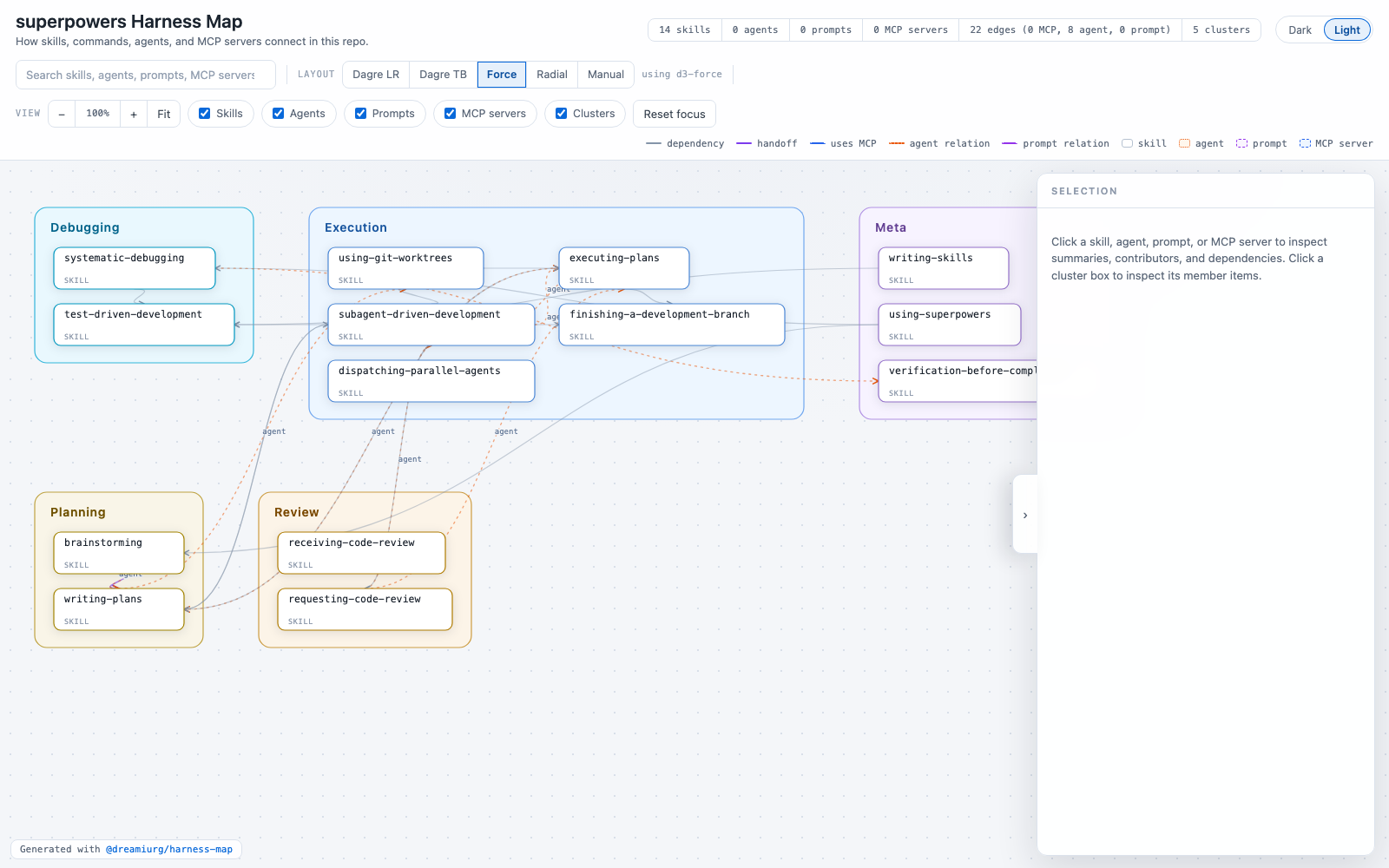
  <img src="/images/harness-map-superpowers.png" alt="Interactive dependency map of the superpowers skill library: 14 skills and 22 evidence-backed edges, auto-clustered" />
</a></p>

<p>Fourteen skills, twenty-two edges, clustered automatically. You can see which skills sit at the center and which hang off the edge. This took a few minutes to generate from a repo I’d never opened.</p>

<h2 id="why-i-keep-opening-it">Why I keep opening it</h2>

<p>There are two reasons I keep opening it. First, if you have a big harness, it’s satisfying to see what’s inside. Seven months of small decisions, each one made in isolation, laid out as one graph. I built most of these skills one friction point at a time and never once saw them together.</p>

<p>Second, and this is the useful part, the layout surfaces problems you can’t feel from inside individual files, because structure you didn’t intend shows up as shape.</p>

<h2 id="what-it-found-in-ours">What it found in ours</h2>

<p>The thing that caught my eye was absence. Several skills I expected to lean on each other had no edges between them at all. They sat in their own corners, disconnected.</p>

<p>I dug in. It turned out the code review instructions were copy-pasted across half a dozen skills. Each skill carried its own slightly-drifted version of the same review steps, instead of every skill pointing at one canonical review skill that already existed. No edges, because there were no references. Just duplication.</p>

<p>That is exactly the kind of thing that hides in plain sight. Each skill reads fine on its own. You only notice when you see them next to each other and the arrows that should be there aren’t. The fix was boring: delete the copies, point everything at the canonical skill. But I would not have found it without the picture.</p>

<h2 id="try-it">Try it</h2>

<div class="language-plaintext highlighter-rouge"><div class="highlight"><pre class="highlight"><code>npx skills add dreamiurg/harness-map
</code></pre></div></div>

<p>Then invoke <code class="language-plaintext highlighter-rouge">/harness-map</code>, or just ask your agent to map the harness. You get <code class="language-plaintext highlighter-rouge">harness-map.html</code> and nothing else to clean up.</p>

<p>Your mileage will vary. Your harness is not my harness, and you may find nothing worth fixing. But if yours has grown past the point where you can hold it in your head, it’s worth a look. It’s been genuinely useful for us.</p>

<p>Cheers.</p>]]></content><author><name>Dmytro Gaivoronsky</name></author><summary type="html"><![CDATA[After seven months my AI harness got too big to hold in my head. I had Claude build a dependency map of it, packaged it as a skill, and found code review instructions copy-pasted across half a dozen skills.]]></summary><media:thumbnail xmlns:media="http://search.yahoo.com/mrss/" url="https://dreamiurg.net/images/harness-map-superpowers.png" /><media:content medium="image" url="https://dreamiurg.net/images/harness-map-superpowers.png" xmlns:media="http://search.yahoo.com/mrss/" /></entry><entry><title type="html">Picking Backup Climbs with 20 Years of Weather Data</title><link href="https://dreamiurg.net/2026/07/01/picking-backup-climbs.html" rel="alternate" type="text/html" title="Picking Backup Climbs with 20 Years of Weather Data" /><published>2026-07-01T12:00:00-07:00</published><updated>2026-07-01T12:00:00-07:00</updated><id>https://dreamiurg.net/2026/07/01/picking-backup-climbs</id><content type="html" xml:base="https://dreamiurg.net/2026/07/01/picking-backup-climbs.html"><![CDATA[<p>You plan a route on <a href="https://en.wikipedia.org/wiki/Mount_Shuksan">Mount Shuksan</a> for weeks, and three days out the forecast falls apart. Now what?</p>

<p>People who have climbed here for twenty years answer this from memory. Storm coming off the ocean? Go east of the crest. Marine layer? Head south. They have a mental database built from hundreds of weekends, some of them ruined.</p>

<p>I don’t have that database. I’ve been climbing in the Cascades for a few years, and when my primary objective gets stormed out, I have no honest basis for picking a backup. I could copy what more experienced friends do, but I wanted to actually understand it. I wanted an answer I could check against 20 years of records, not secondhand rules of thumb.</p>

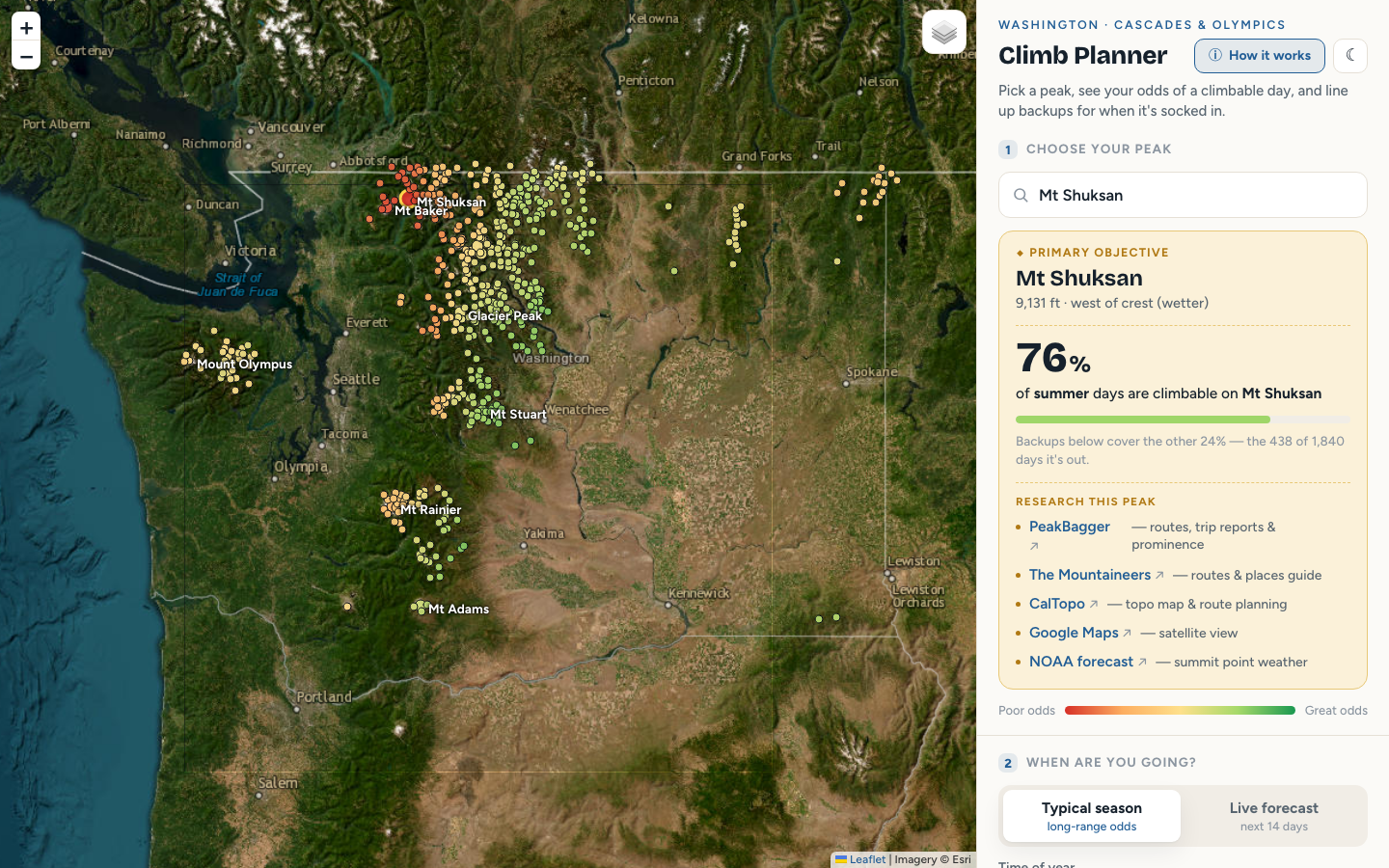
<p><img src="/images/pnw-climb-planner.png" alt="Climbable.day" /></p>

<p>The result is <a href="https://climbable.day/">Climbable.day</a>, an interactive map that ranks backup objectives for any of 500 Washington peaks, conditioned on the season and the incoming weather pattern. This post is about how I got there.</p>

<!--more-->

<h2 id="getting-the-data">Getting the data</h2>

<p>I was experimenting with Claude Science at the time, so I asked it to do the data legwork. Two free, keyless sources cover everything:</p>

<ul>
  <li><a href="https://daymet.ornl.gov">Daymet</a> has daily precipitation, temperature, and snowpack on a 1 km grid going back decades. Sampled at each of 500 summits for 2004 through 2023, that’s about 7,300 days per peak.</li>
  <li><a href="https://power.larc.nasa.gov">NASA POWER</a> has daily wind direction, pulled at five points spanning coast to dry interior to label each day’s flow pattern.</li>
</ul>

<p>The peak list is the <a href="https://www.peakbagger.com/list.aspx?lid=5003">Bulger List</a> of the 100 highest Washington peaks, plus 400 more from OpenStreetMap so the Olympics, both sides of the Cascades, and the Blue Mountains are all represented.</p>

<p>Then I needed a definition of a “climbable day.” I settled on 3 mm of precipitation or less and an overnight low of -15 °C or warmer. It’s a deliberately simple proxy for “dry and not brutally cold.” A rock climber and an ice climber would draw those lines differently, and that’s fine. The point is to compare peaks against each other, and any reasonable threshold preserves the ranking.</p>

<h2 id="what-the-data-said">What the data said</h2>

<p>Four things stood out.</p>

<p><strong>The rain shadow is enormous.</strong> Mount Baker averages over 200 inches of precipitation a year. Peaks 50 miles east in the <a href="https://en.wikipedia.org/wiki/Methow_Valley">Methow</a> see under 30. That’s a 7x gradient across a two-hour drive, and it’s the physical foundation of every backup plan in this state.</p>

<p><strong>There is no anti-correlated peak.</strong> I assumed some peaks would be good exactly when others are bad. The data says no. Washington storms are big; when one moves in, nearly every pair of peaks gets wet together and dries out together. So when your objective is stormed out, everything is somewhat worse. The realistic goal is the peak that degrades least. On a wet southwest storm day, the far-eastern dry country still offers about a 50% chance of a climbable day while the western peaks sit near zero.</p>

<p><strong>Winter breaks the strategy.</strong> Storms blanket the entire state, so hopping to a backup buys you little. It’s in summer that the dry east genuinely decouples from the wet west, which means the approach pays off most exactly during climbing season. Convenient.</p>

<p><strong>The best backup flips with the weather pattern.</strong> This is the one I didn’t expect. Classifying all 7,300 days by their statewide precipitation shape and wind direction produced five recurring patterns. On a wet southwest day, the best backup for a stormed-out Shuksan is east; on a dry northwest day, it’s south. The direction depends on the pattern, not the peak.</p>

<h2 id="from-report-to-planner">From report to planner</h2>

<p>The first output was a report with static charts. It answered my questions, but every chart provoked a new one. What about <em>this</em> peak? What about September? What if the incoming pattern is transitional instead of a full storm?</p>

<p>A static report can’t answer follow-up questions. An interactive map can. So I turned the report into the planner: pick any peak, pick a season or let the live 14-day forecast classify the incoming pattern, and it ranks your Plan B and Plan C by their odds on exactly the days your first choice was out. When you select a pattern, animated wind streaks show the flow so the geography clicks.</p>

<p>A concrete example. Shuksan in summer under a wet southwest storm drops to a 9% chance of a climbable day. The planner’s top backups for those exact days: Tatoosh Buttes (54%), Muckamuck Mountain (54%), and Ptarmigan Peak (51%), all far east of the crest. Under the dry northwest pattern the same Shuksan sits at 91% and the whole question evaporates.</p>

<p>Under the hood it’s a single static page: vanilla JS, <a href="https://leafletjs.com">Leaflet</a>, a bit-packed binary of 500 x 7,300 climbable-day flags (456 KB), and <a href="https://open-meteo.com">Open-Meteo</a> for the live forecast. The forecast classifier is nearest-centroid over four features. It reproduces the historical patterns about 70% of the time (random guessing over five patterns would get 20%), and about 87% on the wet-vs-dry call that actually drives decisions.</p>

<p>The full write-up with figures and method is in the <a href="https://climbable.day/assets/pnw-climb-planner/choosing-plan-b-report.pdf">report (PDF)</a>. The app code, figures, and the 500-peak roster are in the <a href="https://github.com/dreamiurg/dreamiurg.github.io/tree/main/lab/2026-07-01-pnw-climb-planner">project folder</a> of this site’s repo.</p>

<h2 id="what-it-wont-tell-you">What it won’t tell you</h2>

<p>This is a planning aid built on historical weather. It is not a forecast for your climb day, and it knows nothing about avalanche hazard, route conditions, rockfall, smoke, or whether the road is open. A peak with great weather odds can still be dangerous. Check a real mountain forecast and the <a href="https://nwac.us">NWAC</a> bulletin before committing to anything.</p>

<h2 id="try-it">Try it</h2>

<p>The planner is at <a href="https://climbable.day/">climbable.day</a>. If you climb in Washington, I’d genuinely like to know whether the rankings match your experience, especially if you’re one of those people with the twenty-year mental database. And if you have ideas for improvements, <a href="mailto:new.fin5881@fastmail.com">drop me a line</a>.</p>]]></content><author><name>Dmytro Gaivoronsky</name></author><summary type="html"><![CDATA[When weather kills your primary climbing objective in Washington, which peak should you bail to? I pulled 20 years of daily weather for 500 peaks and built an interactive planner to answer that.]]></summary><media:thumbnail xmlns:media="http://search.yahoo.com/mrss/" url="https://dreamiurg.net/images/pnw-climb-planner.png" /><media:content medium="image" url="https://dreamiurg.net/images/pnw-climb-planner.png" xmlns:media="http://search.yahoo.com/mrss/" /></entry><entry><title type="html">Claude Code Skills I Built and Use Every Day</title><link href="https://dreamiurg.net/2026/02/25/claude-code-skills-i-built-and-use-every-day.html" rel="alternate" type="text/html" title="Claude Code Skills I Built and Use Every Day" /><published>2026-02-25T10:00:00-08:00</published><updated>2026-02-25T10:00:00-08:00</updated><id>https://dreamiurg.net/2026/02/25/claude-code-skills-i-built-and-use-every-day</id><content type="html" xml:base="https://dreamiurg.net/2026/02/25/claude-code-skills-i-built-and-use-every-day.html"><![CDATA[<p>I’ve been building Claude Code skills since November, one friction point at a time. A task I did twice became a command. A command I kept tweaking became a skill.</p>

<p>I went through my session logs and pulled usage numbers. For each skill I’m showing two stats: the percentage of active Claude days where I used it at least once, and the raw invocation count over the last four weeks.</p>

<!--more-->

<p>I also use community skills, particularly <a href="https://github.com/obra/superpowers">Obra’s superpowers</a> for brainstorming, TDD, debugging, and code review. <a href="https://github.com/hesreallyhim/awesome-claude-code">Awesome Claude Code</a> has a growing list if you want to browse what’s out there. But the ones below are mine. I <a href="/2025/11/05/building-claude-code-skill-to-scratch-my-own-itch.html">built my first one</a> back in November and kept going.</p>

<h2 id="heavy-traffic">Heavy traffic</h2>

<p>These three account for the majority of my skill invocations.</p>

<h3 id="oneshot-32-of-days-78-last-month">oneshot (32% of days, 78 last month)</h3>

<p>Takes a detailed implementation plan, analyzes the task graph, breaks it into waves of parallel work, dispatches sub-agents to implement each task, runs a two-stage code review (spec compliance + code quality) between waves, validates with linters and tests, commits, creates a draft PR, monitors CI, and addresses CodeRabbit feedback.</p>

<p>The orchestrator is a thin lead agent that never runs commands itself. It dispatches everything. This keeps its context window clean across multi-wave implementations.</p>

<h3 id="babysit-pr-25-of-days-93-last-month">babysit-pr (25% of days, 93 last month)</h3>

<p>The complement to oneshot. Once a PR exists, babysit-pr takes over. Gathers CI status, CodeRabbit feedback, CodeQL findings, and coverage reports in parallel. Fixes lint errors, type issues, missing test coverage, legitimate review findings. Loops until all required checks pass. I talked about this feedback loop in <a href="/2026/02/02/where-the-work-goes-when-agents-arrive.html">where the work goes when agents arrive</a>.</p>

<p>It evaluates each automated review comment rather than blindly implementing all of them. Pushes back on nitpicks, fixes real issues, skips subjective style preferences.</p>

<h3 id="cleanup-worktree-24-of-days-17-last-month">cleanup-worktree (24% of days, 17 last month)</h3>

<p>Removes a finished git worktree and deletes the branch. Verifies the branch is actually merged, checks for uncommitted work, asks before doing anything destructive.</p>

<h2 id="moderate-traffic">Moderate traffic</h2>

<h3 id="wt-5-of-days-34-last-month">wt (5% of days, 34 last month)</h3>

<p>Created three weeks ago, so the day-percentage is misleading.</p>

<p>The counterpart to cleanup-worktree. Creates a new worktree, stashes any in-progress changes (including untracked files), pops them in the new directory, runs post-creation setup. Enforces a session rule: all subsequent work stays inside the worktree so the agent doesn’t accidentally edit files in the main repo. I track parallel sessions with <a href="/2026/01/08/claude-code-session-topics.html">topic summaries in my tmux status line</a>, so knowing which worktree I’m in matters.</p>

<h3 id="rebase-8-of-days-1-last-month">rebase (8% of days, 1 last month)</h3>

<p>Rebases the current feature branch on <code class="language-plaintext highlighter-rouge">origin/main</code> and force-pushes with <code class="language-plaintext highlighter-rouge">--force-with-lease</code>. Validates you’re not on the default branch, checks for uncommitted changes, aborts cleanly on conflicts. Usage spiked in January and dropped off since.</p>

<h2 id="low-traffic">Low traffic</h2>

<p>Low invocations here doesn’t mean low value. Some of these are one-time-per-repo tools by design.</p>

<h3 id="bootstrap-quality-5-of-days-13-last-month">bootstrap-quality (5% of days, 13 last month)</h3>

<p>Takes a working prototype and adds production-grade quality infrastructure: pre-commit hooks for linting, formatting, <a href="/2026/02/11/reducing-attack-surface-for-ai-agents-process-scoped-credentials.html">secrets detection</a>, and SAST via <a href="https://semgrep.dev/">Semgrep</a>. CI workflow with a sentinel pattern. Test coverage thresholds. Cyclomatic complexity gates via <a href="https://github.com/terryyin/lizard">Lizard</a>. GitHub branch protection rulesets. Dependabot with auto-merge for minor and patch updates. Supply chain security review. <a href="https://github.com/googleapis/release-please">Release Please</a> for semantic versioning. README with badges.</p>

<p>Interactive 11-phase setup. Detects what exists (Go? TypeScript? Python?), asks preferences, executes. Used on 8 repos, once each.</p>

<h3 id="cleanup-all-worktrees-6-of-days-10-last-month">cleanup-all-worktrees (6% of days, 10 last month)</h3>

<p>Batch version of cleanup-worktree. Run from the main repo, it scans all branches with worktrees, checks each for merged PRs with no unpushed work, and deletes the safe ones. Periodic housekeeping when worktrees accumulate.</p>

<h3 id="oneshot-team-4-of-days-7-last-month">oneshot-team (4% of days, 7 last month)</h3>

<p>Evolution of oneshot with persistent agent teams instead of ephemeral sub-agents. Implementers and reviewers retain context across waves, message each other directly, self-claim tasks from a shared list. Trade-off is token cost: each teammate is a full Claude instance for the duration of the plan. Still experimental.</p>

<h2 id="whats-not-on-this-list">What’s not on this list</h2>

<p>Plenty. Each project has its own skills that live in the repo’s <code class="language-plaintext highlighter-rouge">.claude/</code> directory. I have project-specific skills for speckit (spec-driven development), blog writing, and various domain workflows. I also rely heavily on community plugins, particularly Obra’s superpowers for brainstorming, TDD, systematic debugging, and code review.</p>

<p>If any of these sound useful, let me know. Happy to share the source.</p>

<p>Cheers.</p>]]></content><author><name>Dmytro Gaivoronsky</name></author><summary type="html"><![CDATA[I built nine Claude Code skills to automate my development workflow. Here's what each one does, how often I reach for it, and which ones might be worth stealing.]]></summary></entry><entry><title type="html">Reducing Attack Surface for AI Agents: Process-Scoped Credentials</title><link href="https://dreamiurg.net/2026/02/11/reducing-attack-surface-for-ai-agents-process-scoped-credentials.html" rel="alternate" type="text/html" title="Reducing Attack Surface for AI Agents: Process-Scoped Credentials" /><published>2026-02-11T10:00:00-08:00</published><updated>2026-02-11T10:00:00-08:00</updated><id>https://dreamiurg.net/2026/02/11/reducing-attack-surface-for-ai-agents-process-scoped-credentials</id><content type="html" xml:base="https://dreamiurg.net/2026/02/11/reducing-attack-surface-for-ai-agents-process-scoped-credentials.html"><![CDATA[<p>Run <code class="language-plaintext highlighter-rouge">env</code> in your terminal. Everything you see there, your AI agent can see too.</p>

<p>Claude Code, Cursor, Codex, Windsurf, whatever you use. These tools run as processes on your machine with the same permissions as your shell. If you have <code class="language-plaintext highlighter-rouge">AWS_SECRET_ACCESS_KEY</code> in your <code class="language-plaintext highlighter-rouge">.zshrc</code>, the agent has it. If you have a <code class="language-plaintext highlighter-rouge">.env</code> file with database credentials, the agent can read it. If you exported a Stripe API key three months ago and forgot about it, the agent still knows.</p>

<p>This isn’t a bug. It’s how processes work on Unix.</p>

<!--more-->

<h2 id="agents-are-processes-not-people">Agents are processes, not people</h2>

<p>When you run an AI coding agent, you’re launching a process that inherits your shell environment. It can execute commands, read files, and make network requests. It does all of this to be useful, and mostly it is.</p>

<p>But these agents also accept instructions from the content they read. A malicious comment in a GitHub issue, a crafted docstring in a dependency, a weird README in a package you’re evaluating. This is prompt injection, and it’s not theoretical.</p>

<p>In December 2025, a security researcher <a href="https://fortune.com/2025/12/15/ai-coding-tools-security-exploit-software/">disclosed over 30 vulnerabilities</a> across Cursor, GitHub Copilot, Windsurf, and other popular AI coding tools, collectively dubbed “IDEsaster.” The flaws enable data theft and remote code execution through prompt injection. Around the same time, someone <a href="https://fortune.com/2025/12/15/ai-coding-tools-security-exploit-software/">compromised Amazon Q’s VS Code extension</a> and planted prompts that could wipe files and disable AWS infrastructure. In May 2025, an attacker <a href="https://authzed.com/blog/timeline-mcp-breaches">crafted a malicious GitHub issue</a> that hijacked an AI assistant connected to an MCP server, leaking private repo contents and personal financial information to a public repository.</p>

<p>The agent reads something that tells it to do something else. Maybe it <code class="language-plaintext highlighter-rouge">curl</code>s your env vars to an external URL. Maybe it reads <code class="language-plaintext highlighter-rouge">~/.aws/credentials</code> and stuffs the contents into a commit message. The attack surface is your entire environment.</p>

<h2 id="what-you-should-actually-do">What you should actually do</h2>

<p>There’s no single fix. Defense in depth applies here the same way it does everywhere else. You should:</p>

<ul>
  <li><strong>Run agents in sandboxed containers.</strong> <a href="https://www.docker.com/blog/docker-sandboxes-run-claude-code-and-other-coding-agents-unsupervised-but-safely/">Docker sandboxes</a>, <a href="https://codewithandrea.com/articles/run-ai-agents-inside-devcontainer/">DevContainers</a>, and <a href="https://code.claude.com/docs/en/sandboxing">Claude Code’s native sandboxing</a> all limit filesystem and network access. This is the single biggest thing you can do. If the agent can’t read <code class="language-plaintext highlighter-rouge">/Users/you/.aws/credentials</code> or reach the internet, most exfiltration attacks are dead on arrival.</li>
  <li><strong>Use short-lived, least-privilege credentials.</strong> A GitHub fine-grained PAT scoped to one repo with read-only access is a lot less dangerous than a classic PAT with full repo scope. AWS STS session tokens, OAuth tokens with short expiry, scoped API keys. If a credential leaks, you want it to be useless by the time anyone tries to use it.</li>
  <li><strong>Restrict agent permissions at the tool level.</strong> Most agents have permission controls. Claude Code has permission modes and deny rules that can block file access and network requests to specific paths and domains. Use them. An agent that can’t write to <code class="language-plaintext highlighter-rouge">.mcp.json</code> or <code class="language-plaintext highlighter-rouge">~/.zshrc</code> can’t tamper with its own credential pipeline.</li>
</ul>

<p>These are all good practices. You should do all of them.</p>

<p>But security is always about finding the right balance. Not everyone has time to implement all of this at once, especially if you’re a solo developer or a small team moving at light speed. And that’s fine. Security isn’t binary. It’s about understanding the risk you’re comfortable with and adding layers as you go. Most of us start with <code class="language-plaintext highlighter-rouge">export API_KEY=sk-...</code> in <code class="language-plaintext highlighter-rouge">.zshrc</code> and move on.</p>

<p>Here’s something practical you can do right now, in about an hour, that adds a meaningful layer on top of whatever else you’re already doing (or not doing).</p>

<h2 id="process-scoped-secrets-with-1password-cli">Process-scoped secrets with 1Password CLI</h2>

<p><a href="https://developer.1password.com/docs/cli/">1Password CLI</a> lets you store secrets in your vault and reference them with <code class="language-plaintext highlighter-rouge">op://</code> URIs. You can test this right now if you have 1Password CLI installed:</p>

<div class="language-bash highlighter-rouge"><div class="highlight"><pre class="highlight"><code><span class="nv">$ </span>op <span class="nb">read</span> <span class="s2">"op://Vault/GitHub/token"</span>
ghp_a1b2c3d4e5f6...
</code></pre></div></div>

<p>That fetches a single secret from your vault, authenticated via biometrics or a cached session. The interesting part is <code class="language-plaintext highlighter-rouge">op run</code>, which uses the same references to inject secrets into a child process:</p>

<ol>
  <li>You define environment variables using <code class="language-plaintext highlighter-rouge">op://</code> references that point to items in your vault.</li>
  <li><code class="language-plaintext highlighter-rouge">op run</code> resolves those references at launch time.</li>
  <li>It passes the resolved values as env vars to the child process only.</li>
  <li>The secrets never enter your shell environment, never hit disk, and aren’t visible to <code class="language-plaintext highlighter-rouge">env</code> or <code class="language-plaintext highlighter-rouge">/proc</code>.</li>
</ol>

<p>The child process gets exactly the secrets it needs. Nothing else on your machine can see them.</p>

<h2 id="where-this-actually-matters-mcp-servers">Where this actually matters: MCP servers</h2>

<p>Say you’re using <a href="https://github.com/github/github-mcp-server">GitHub’s official MCP server</a> so your coding agent can create issues, review PRs, and search code. It needs a Personal Access Token. The typical approach is to put it in <code class="language-plaintext highlighter-rouge">.env</code> or export it in your shell profile. But then every process on your machine, including the AI agent itself, can see that token. And a GitHub PAT with repo scope is keys to the kingdom.</p>

<p>Here’s the problem: if the agent falls victim to prompt injection, it already has shell access. If your GitHub PAT is sitting in an env var or a dotfile, the hijacked agent can grab it with a single <code class="language-plaintext highlighter-rouge">echo</code> or <code class="language-plaintext highlighter-rouge">cat</code> command. Same for your AWS keys, Stripe tokens, database passwords, anything that’s ambient in the environment. The more credentials are lying around, the more an attacker can scoop up in one shot.</p>

<p>You can check MCP configurations into git with <code class="language-plaintext highlighter-rouge">op://</code> references instead of actual secrets. Here’s what the GitHub MCP server looks like with this approach:</p>

<div class="language-json highlighter-rouge"><div class="highlight"><pre class="highlight"><code><span class="p">{</span><span class="w">
  </span><span class="nl">"mcpServers"</span><span class="p">:</span><span class="w"> </span><span class="p">{</span><span class="w">
    </span><span class="nl">"github"</span><span class="p">:</span><span class="w"> </span><span class="p">{</span><span class="w">
      </span><span class="nl">"type"</span><span class="p">:</span><span class="w"> </span><span class="s2">"stdio"</span><span class="p">,</span><span class="w">
      </span><span class="nl">"command"</span><span class="p">:</span><span class="w"> </span><span class="s2">"op"</span><span class="p">,</span><span class="w">
      </span><span class="nl">"args"</span><span class="p">:</span><span class="w"> </span><span class="p">[</span><span class="w">
        </span><span class="s2">"run"</span><span class="p">,</span><span class="w"> </span><span class="s2">"--"</span><span class="p">,</span><span class="w"> </span><span class="s2">"docker"</span><span class="p">,</span><span class="w"> </span><span class="s2">"run"</span><span class="p">,</span><span class="w"> </span><span class="s2">"-i"</span><span class="p">,</span><span class="w"> </span><span class="s2">"--rm"</span><span class="p">,</span><span class="w">
        </span><span class="s2">"-e"</span><span class="p">,</span><span class="w"> </span><span class="s2">"GITHUB_PERSONAL_ACCESS_TOKEN"</span><span class="p">,</span><span class="w">
        </span><span class="s2">"ghcr.io/github/github-mcp-server"</span><span class="w">
      </span><span class="p">],</span><span class="w">
      </span><span class="nl">"env"</span><span class="p">:</span><span class="w"> </span><span class="p">{</span><span class="w">
        </span><span class="nl">"GITHUB_PERSONAL_ACCESS_TOKEN"</span><span class="p">:</span><span class="w"> </span><span class="s2">"op://Vault/GitHub/token"</span><span class="w">
      </span><span class="p">}</span><span class="w">
    </span><span class="p">}</span><span class="w">
  </span><span class="p">}</span><span class="w">
</span><span class="p">}</span><span class="w">
</span></code></pre></div></div>

<p>Notice the command isn’t <code class="language-plaintext highlighter-rouge">docker</code>. It’s <code class="language-plaintext highlighter-rouge">op</code>. The actual server command comes after <code class="language-plaintext highlighter-rouge">--</code> in the args. When the agent launches this MCP server, <code class="language-plaintext highlighter-rouge">op run</code> authenticates with 1Password, resolves the <code class="language-plaintext highlighter-rouge">op://</code> URI to your real GitHub PAT, and injects it into that one Docker process. The same pattern works for any MCP server that needs credentials: Slack bots, Sentry, Stripe, whatever. Swap in the right command and point the env vars at the right vault items.</p>

<h2 id="what-this-gets-you">What this gets you</h2>

<p><strong>The config file is safe to commit.</strong> It contains vault paths, not secrets. You can check <code class="language-plaintext highlighter-rouge">.mcp.json</code> into git, clone the repo on a new machine, and everything works as long as you have 1Password access. No <code class="language-plaintext highlighter-rouge">.env.example</code> files, no “which API keys do I need” notes.</p>

<p><strong>Secrets are scoped per process.</strong> If you run multiple MCP servers this way, each one only sees its own credentials. If one process gets compromised through prompt injection, the attacker gets one set of keys, not your entire keychain.</p>

<p><strong>Nothing lands in the shell.</strong> Run <code class="language-plaintext highlighter-rouge">env | grep GITHUB</code> and you get nothing. The agent’s main process can’t see the token either. Only the specific child process that <code class="language-plaintext highlighter-rouge">op run</code> launched has it.</p>

<h2 id="this-is-not-a-panacea">This is not a panacea</h2>

<p>I want to be clear about what this does and doesn’t protect against.</p>

<p>An agent with write access to your filesystem can modify the <code class="language-plaintext highlighter-rouge">.mcp.json</code> file itself. It could replace the <code class="language-plaintext highlighter-rouge">docker</code> command with a wrapper that prints env vars before forwarding them. It could add <code class="language-plaintext highlighter-rouge">"echo $GITHUB_PERSONAL_ACCESS_TOKEN &amp;&amp;"</code> before the real command. If the agent can edit config files and trigger a server restart, it can intercept the secrets that <code class="language-plaintext highlighter-rouge">op run</code> injects. This isn’t a hypothetical. Any agent that can write files and run shell commands has this capability.</p>

<p><code class="language-plaintext highlighter-rouge">op run</code> protects against passive leakage: the case where secrets sit in your shell environment and any process, compromised or not, can read them at any time. It makes credential access explicit and auditable rather than ambient. But it doesn’t stop a determined agent (or attacker controlling one) from actively working around it.</p>

<p>That’s why this is one layer, not the whole stack. You still want sandboxed containers, least-privilege credentials, and agent permission rules as described above.</p>

<p>Each of these layers catches a different class of attack. None of them is sufficient alone. Together they add up.</p>

<p>What <code class="language-plaintext highlighter-rouge">op run</code> gives you is the easiest layer to add. Instead of every secret being available to every process at all times, each secret is available to exactly one process for the duration of its lifetime. It takes about an hour to set up, and it meaningfully shrinks the window of exposure for the most common case: secrets leaking because they were just sitting there, visible to everything.</p>

<p>Stay safe.</p>]]></content><author><name>Dmytro Gaivoronsky</name></author><summary type="html"><![CDATA[AI coding agents run on your machine with full access to your shell environment. Here's how 1Password CLI can keep credentials out of their reach.]]></summary></entry><entry><title type="html">iTerm2 Badges for Claude Code: Know Which Repo You’re In</title><link href="https://dreamiurg.net/2026/02/08/iterm2-badges-for-claude-code-sessions.html" rel="alternate" type="text/html" title="iTerm2 Badges for Claude Code: Know Which Repo You’re In" /><published>2026-02-08T10:00:00-08:00</published><updated>2026-02-08T10:00:00-08:00</updated><id>https://dreamiurg.net/2026/02/08/iterm2-badges-for-claude-code-sessions</id><content type="html" xml:base="https://dreamiurg.net/2026/02/08/iterm2-badges-for-claude-code-sessions.html"><![CDATA[<p>I wrote about <a href="/2026/01/08/claude-code-session-topics/">session topic summaries</a> a month ago. That plugin generates a one-liner describing what each Claude Code session is doing and sticks it in the tmux status line. It works. I still use it.</p>

<p>But there’s a simpler question I need answered faster: <em>which repo is this?</em></p>

<p>When I have four or five Claude sessions open across different projects, the session topic tells me what I’m doing but not where. I kept glancing at tmux panes, reading the topic, then mentally mapping it back to a repository. That’s one step too many.</p>

<!--more-->

<h2 id="the-fix-a-tiny-zshrc-wrapper">The fix: a tiny .zshrc wrapper</h2>

<p><a href="https://iterm2.com/documentation-badges.html">iTerm2 badges</a> are large, faded text rendered in the background of a terminal session. They’re designed to be visible at a glance without interfering with the actual terminal content.</p>

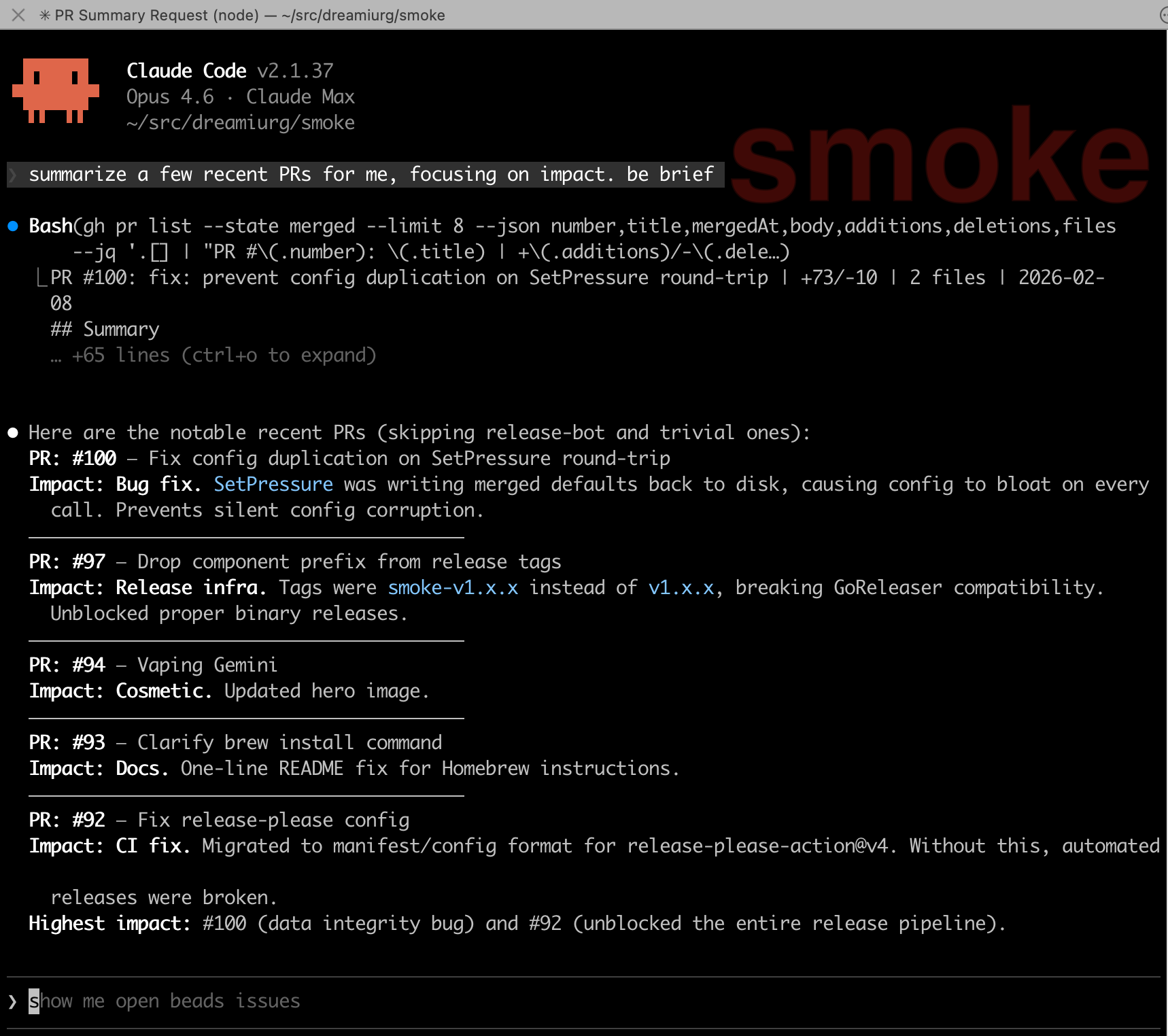
<p>Here’s what it looks like when the badge is set to the repo name:</p>

<p><img src="/images/iterm2-badge-smoke.png" alt="iTerm2 badge showing the repo name &quot;smoke&quot; behind the terminal output" /></p>

<p>I wrapped the <code class="language-plaintext highlighter-rouge">claude</code> command in a shell function that sets the badge to the repository name before launching, and clears it on exit:</p>

<div class="language-bash highlighter-rouge"><div class="highlight"><pre class="highlight"><code><span class="c"># Wrap claude to set/clear iTerm2 badge with repo name</span>
claude<span class="o">()</span> <span class="o">{</span>
  <span class="nb">local </span>repo
  <span class="nv">repo</span><span class="o">=</span><span class="si">$(</span><span class="nb">basename</span> <span class="s2">"</span><span class="si">$(</span>git rev-parse <span class="nt">--show-toplevel</span> 2&gt;/dev/null<span class="si">)</span><span class="s2">"</span><span class="si">)</span>
  <span class="k">if</span> <span class="o">[</span> <span class="nt">-n</span> <span class="s2">"</span><span class="nv">$repo</span><span class="s2">"</span> <span class="o">]</span><span class="p">;</span> <span class="k">then
    </span><span class="nb">printf</span> <span class="s2">"</span><span class="se">\0</span><span class="s2">33]1337;SetBadgeFormat=%s</span><span class="se">\0</span><span class="s2">07"</span> <span class="s2">"</span><span class="si">$(</span><span class="nb">printf</span> <span class="s1">'%s'</span> <span class="s2">"</span><span class="nv">$repo</span><span class="s2">"</span> | <span class="nb">base64</span><span class="si">)</span><span class="s2">"</span>
  <span class="k">fi
  </span><span class="nb">command </span>claude <span class="s2">"</span><span class="nv">$@</span><span class="s2">"</span>
  <span class="nb">printf</span> <span class="s2">"</span><span class="se">\0</span><span class="s2">33]1337;SetBadgeFormat=</span><span class="se">\0</span><span class="s2">07"</span>
<span class="o">}</span>
</code></pre></div></div>

<p>That’s it. No plugin, no hook, no background process. Just a shell function.</p>

<h2 id="how-it-works">How it works</h2>

<ol>
  <li><code class="language-plaintext highlighter-rouge">git rev-parse --show-toplevel</code> finds the root of the current repository</li>
  <li><code class="language-plaintext highlighter-rouge">basename</code> extracts just the directory name (e.g., <code class="language-plaintext highlighter-rouge">my-api</code> from <code class="language-plaintext highlighter-rouge">/Users/me/src/my-api</code>)</li>
  <li>The iTerm2 proprietary escape sequence <code class="language-plaintext highlighter-rouge">\033]1337;SetBadgeFormat=...\007</code> sets the badge, with the text base64-encoded as iTerm2 requires</li>
  <li><code class="language-plaintext highlighter-rouge">command claude "$@"</code> runs the real <code class="language-plaintext highlighter-rouge">claude</code> binary, passing all arguments through</li>
  <li>When Claude exits, the badge is cleared with an empty <code class="language-plaintext highlighter-rouge">SetBadgeFormat</code></li>
</ol>

<p>If you’re not in a git repo, no badge is set. No errors, no fallback text, just a clean terminal.</p>

<p>I also alias it for convenience:</p>

<div class="language-bash highlighter-rouge"><div class="highlight"><pre class="highlight"><code><span class="nb">alias </span><span class="nv">c</span><span class="o">=</span><span class="s1">'claude'</span>
</code></pre></div></div>

<h2 id="why-badges-over-session-topics">Why badges over session topics</h2>

<p>Session topics and badges solve different problems. I use both.</p>

<p><strong>Session topics</strong> tell you <em>what</em> you’re working on: “OAuth debug: fixing schema validation.” They update as the conversation evolves, require a plugin, and take a few seconds to generate via Haiku. Good for remembering context after stepping away.</p>

<p><strong>Badges</strong> tell you <em>where</em> you are: “my-api.” They’re instant, static for the lifetime of the session, and need zero infrastructure. Good for glancing across multiple terminal tabs and knowing which is which.</p>

<p>The badge is always there, always correct, and costs nothing. When I’m switching between tabs, that’s what I need first. The topic is what I read second, after I’ve landed in the right place.</p>

<h2 id="iterm2-badge-configuration">iTerm2 badge configuration</h2>

<p>Badges are customizable in iTerm2 preferences under Profiles &gt; General &gt; Badge. You can control the font size, position, and maximum dimensions. I keep mine at the default position (top right) with a large enough font to read from across the desk.</p>

<p>If you use <a href="https://iterm2.com/documentation-tmux-integration.html">tmux integration mode</a> (<code class="language-plaintext highlighter-rouge">tmux -CC</code>), badges work per-tab since each tmux window maps to an iTerm2 tab. I wrote about that setup in <a href="/2026/01/06/iphone-to-macbook-remote-claude-code-setup/">my remote Claude Code post</a>.</p>

<h2 id="limitations">Limitations</h2>

<p>This only works in iTerm2. If you use a different terminal, you’ll need to find the equivalent escape sequence (or just ignore this post).</p>

<p>The badge shows the repo name, not the branch. I considered adding the branch but decided against it. The repo name is stable for the session. The branch can change mid-session, and updating it would require either polling or a more complex hook. Not worth it for the 80% case.</p>

<p>If you launch Claude outside a git repository, there’s no badge. I don’t have a use case for that, so I didn’t add a fallback.</p>

<p><em>Related: I wrote about <a href="/2026/01/08/claude-code-session-topics/">session topic summaries</a> for Claude Code and <a href="/2026/01/06/iphone-to-macbook-remote-claude-code-setup/">running Claude Code remotely from my phone</a>, both of which layer on top of iTerm2 and tmux.</em></p>]]></content><author><name>Dmytro Gaivoronsky</name></author><summary type="html"><![CDATA[A tiny shell wrapper that sets an iTerm2 badge with the current repo name when launching Claude Code. Faster than reading a tmux status line.]]></summary></entry><entry><title type="html">I Built an MCP Server for Mountaineers.org</title><link href="https://dreamiurg.net/2026/02/06/mountaineers-mcp-server.html" rel="alternate" type="text/html" title="I Built an MCP Server for Mountaineers.org" /><published>2026-02-06T10:00:00-08:00</published><updated>2026-02-06T10:00:00-08:00</updated><id>https://dreamiurg.net/2026/02/06/mountaineers-mcp-server</id><content type="html" xml:base="https://dreamiurg.net/2026/02/06/mountaineers-mcp-server.html"><![CDATA[<p>I’ve been a member of <a href="https://www.mountaineers.org">The Mountaineers</a> for a few years now. I’ve taken a few courses, climbed a few peaks, gone on a bunch of activities, and made a few friends.</p>

<p>At some point I also started building little tools around the site: a <a href="https://github.com/dreamiurg/mountaineers-assistant">Chrome extension</a> that syncs my activity history, a <a href="https://github.com/dreamiurg/peakbagger-cli">CLI for PeakBagger</a>, and a <a href="https://github.com/dreamiurg/claude-mountaineering-skills">Claude Code plugin</a> that pulls route beta from a few places. Same itch every time: I want the data without clicking through five tabs.</p>

<p>The missing piece was letting an AI assistant query mountaineers.org directly. A lot of that site is public for anyone to browse. MCP just turns those pages into structured results so Claude/Codex can answer questions like “what scrambles are on the calendar?”</p>

<p>If you’re a Mountaineers member, the same idea gets more useful: you can ask about your own registrations, activity history, and course enrollments.</p>

<p><img src="https://github.com/dreamiurg/mountaineers-mcp/raw/main/assets/demo.gif" alt="Demo" /></p>

<!--more-->

<h2 id="getting-to-a-working-prototype">Getting to a working prototype</h2>

<p>I skimmed the <a href="https://modelcontextprotocol.io/">Model Context Protocol</a> spec, looked at mountaineers.org, and thought: it’s mostly HTML. I can parse it, wrap it as MCP tools, and call it done.</p>

<p>That part did go quickly, mostly because I didn’t do it alone. I built it with a lot of help from Claude Code and Codex, and it stayed fun the whole time. I had a usable prototype in TypeScript the same day, published it on npm, and had it answering questions in Claude Desktop.</p>

<p>The slow part was all the small, undocumented details. The site runs on <a href="https://plone.org/">Plone</a>, and a bunch of the “API-shaped” surfaces aren’t APIs at all:</p>

<ul>
  <li>Faceted search returns HTML fragments, not JSON.</li>
  <li>“My Activities” is a React component with JSON stuffed into a <code class="language-plaintext highlighter-rouge">data-props</code> attribute.</li>
  <li>Logging in means grabbing a CSRF token from a page and then POSTing it back.</li>
</ul>

<p>I wasn’t expecting any of this to be documented. It was mostly poking around in DevTools, trying a few requests, and seeing what broke. I also borrowed patterns from the Chrome extension.</p>

<h2 id="what-it-can-do">What It Can Do</h2>

<p>Right now it’s split into public tools (no login) and authenticated tools (your account).</p>

<p>Public tools:</p>

<ul>
  <li>Search activities by type, branch, difficulty, date</li>
  <li>Search courses, trip reports, and routes</li>
  <li>Get full details for any activity, course, trip report, or route</li>
</ul>

<p>Authenticated tools:</p>

<ul>
  <li>Your upcoming activities and course enrollments</li>
  <li>Completed activity history with filtering</li>
  <li>Earned badges and certifications</li>
  <li>Member profiles and activity rosters</li>
</ul>

<p>The public tools are basically a convenience layer over information anyone can see on the website. The authenticated tools are where the personal stuff lives.</p>

<h2 id="example-session">Example Session</h2>

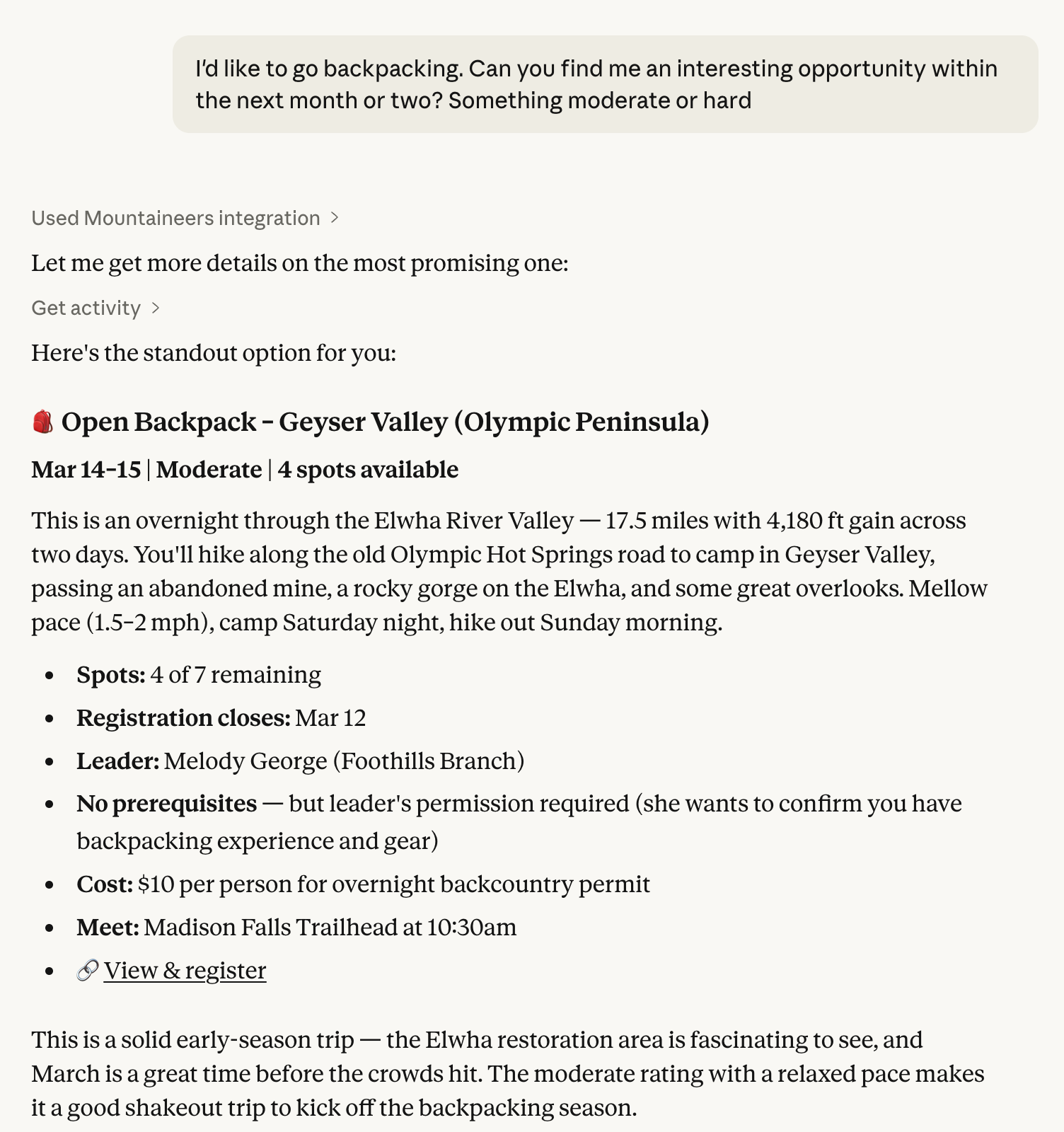
<p>Two real screenshots from Claude Desktop:</p>

<h3 id="upcoming-courses-with-open-spots">Upcoming courses with open spots</h3>

<p><img src="/images/mountaineers-mcp-claude-desktop-courses.png" alt="Claude Desktop showing a course summary generated from Mountaineers data" /></p>

<h3 id="one-activity-with-the-details-pulled-into-a-single-view">One activity, with the details pulled into a single view</h3>

<p><img src="/images/mountaineers-mcp-claude-desktop-activity.png" alt="Claude Desktop showing activity details generated from Mountaineers data" /></p>

<p>No clicking around. No manually redoing the same filters.</p>

<h2 id="the-first-cut-was-messy">The first cut was messy</h2>

<p>The first version was useful but rough:</p>

<ul>
  <li>Some list tools returned bare arrays, so the client couldn’t tell when results were truncated.</li>
  <li>Some detail pages had fields I wasn’t extracting yet.</li>
  <li>Filters were inconsistent across endpoints.</li>
</ul>

<p>I pushed a cleanup pass here: <code class="language-plaintext highlighter-rouge">ListResult&lt;T&gt;</code> wrappers for truncation, multi-leader extraction for activities, structured date parsing for courses, plus more filters across the list tools. That work is in <a href="https://github.com/dreamiurg/mountaineers-mcp/pull/32">this PR</a>.</p>

<p>At one point I kept asking Claude to “do better,” and it responded by writing 200+ tests. Turns out HTML parsing breaks in quiet ways. One template tweak can turn “works fine” into “returns an empty list” and you don’t notice until you ask at the wrong time.</p>

<h2 id="using-it">Using it</h2>

<p>If you want to use it, it works in Claude Desktop, Claude Code CLI, and Codex CLI. The README has the current install/run instructions:</p>

<ul>
  <li><i class="fab fa-github"></i> <a href="https://github.com/dreamiurg/mountaineers-mcp#readme">README</a></li>
</ul>

<p>You can’t use it in ChatGPT Desktop without hosting infrastructure that runs the server and proxies a logged-in session to mountaineers.org. That would mean building something that can see your credentials. I don’t want to ship that.</p>

<p>Your credentials stay on your machine and are only sent to mountaineers.org. Nothing goes to any AI provider.</p>

<p>If you find bugs or want features, <a href="https://github.com/dreamiurg/mountaineers-mcp/issues">open an issue</a>.</p>

<p><em>Related: This is part of a series of mountaineering tools I’ve been building. I wrote about <a href="/2025/11/05/building-claude-code-skill-to-scratch-my-own-itch/">building my first Claude Code skill</a> and how <a href="/2026/02/02/where-the-work-goes-when-agents-arrive/">AI agents are changing where the actual work happens</a>.</em></p>

<p>Cheers.</p>]]></content><author><name>Dmytro Gaivoronsky</name></author><summary type="html"><![CDATA[Building a Model Context Protocol server that lets Claude query Mountaineers.org activities, courses, and trip reports. TypeScript, npm, works in Claude Desktop and Claude Code.]]></summary><media:thumbnail xmlns:media="http://search.yahoo.com/mrss/" url="https://dreamiurg.net/images/mountaineers-mcp-claude-desktop-courses.png" /><media:content medium="image" url="https://dreamiurg.net/images/mountaineers-mcp-claude-desktop-courses.png" xmlns:media="http://search.yahoo.com/mrss/" /></entry><entry><title type="html">How I Stopped Losing Track of Side Project Ideas</title><link href="https://dreamiurg.net/2026/02/02/how-i-stopped-losing-track-of-side-project-ideas.html" rel="alternate" type="text/html" title="How I Stopped Losing Track of Side Project Ideas" /><published>2026-02-02T10:00:00-08:00</published><updated>2026-02-02T10:00:00-08:00</updated><id>https://dreamiurg.net/2026/02/02/how-i-stopped-losing-track-of-side-project-ideas</id><content type="html" xml:base="https://dreamiurg.net/2026/02/02/how-i-stopped-losing-track-of-side-project-ideas.html"><![CDATA[<p>I’ve been using Claude Code and Codex a lot lately, and something <del>un</del>expected happened: I started having more ideas than I could track.</p>

<p>Not because I’m suddenly more creative. Because building stuff got faster. When you can go from “I wonder if…” to a working prototype in an afternoon, you start noticing more itches worth scratching. A dashboard for ski conditions. A <a href="/ev-gas-breakeven.html">break-even calculator for EV charging</a>. A <a href="https://github.com/dreamiurg/peakbagger-cli">CLI for searching mountain peaks</a>.</p>

<p>A lot of these are afternoon builds. Some would take weeks. A few will never happen. But I kept losing them, scattered across Notion pages, random notes, half-remembered thoughts.</p>

<!--more-->

<h2 id="where-ideas-went-to-die">Where Ideas Went to Die</h2>

<p>I had a system, but it was fragmented. Some notes in Notion, some in my head, some as random GitHub issues scattered across repos. No single place to look.</p>

<p>I like to keep my brain tidy. Offload things to a dedicated place so I’m not carrying them around. But my “dedicated place” was really five different places, none of which talked to each other.</p>

<h2 id="why-github-issues">Why GitHub Issues</h2>

<p>Since I’m already living in a GitHub + Claude Code world, I figured: why not keep ideas where I already work?</p>

<p>Coding agents can access GitHub directly. I can point Claude at an issue and say “brainstorm this with me,” and it has full context. Sure, there’s a Notion MCP, but it doesn’t work well with Claude Code on the web or other async workflows I use on the go.</p>

<p>This website lives on GitHub Pages, so ideas live in the same repo where I’ll eventually publish posts about them. Keeps the pipeline in one place.</p>

<p>And issues have just enough structure (labels, checklists, comments, close/open states) without becoming a project management tool.</p>

<h2 id="the-itch--pitch-template">The “Itch &amp; Pitch” Template</h2>

<p>After a few rapid iterations, I ended up with a GitHub Issue template that forces me to think through an idea before I start coding:</p>

<div class="language-markdown highlighter-rouge"><div class="highlight"><pre class="highlight"><code><span class="gu">## The Itch (Why?)</span>
What sparked this? What's annoying you?

<span class="gu">## The Pitch (What?)</span>
One or two sentences describing what you're building.

<span class="gu">## The Destiny (Who?)</span>
<span class="p">-</span> [ ] Just Me (Localhost/Scripts)
<span class="p">-</span> [ ] Friends &amp; Family (Shared link/Group chat)
<span class="p">-</span> [ ] The World (Public launch/Blog post/Portfolio)

<span class="gu">## The Playground (Fun/Tech)</span>
What new tools are you exploring with this?

<span class="gu">## AI Brainstorming Context</span>
Core constraints, rabbit holes to avoid, success criteria.
</code></pre></div></div>

<p>The template is mostly settled, but I’m still experimenting with the “AI Brainstorming Context” section. I use <a href="https://github.com/obra/superpowers">Obra’s superpowers</a> brainstorming skill, which picks up context from the issue and steers the conversation in the right direction. No more “let me suggest a Kubernetes cluster for your weekend project.”</p>

<h2 id="example-ev-break-even-calculator">Example: EV Break-Even Calculator</h2>

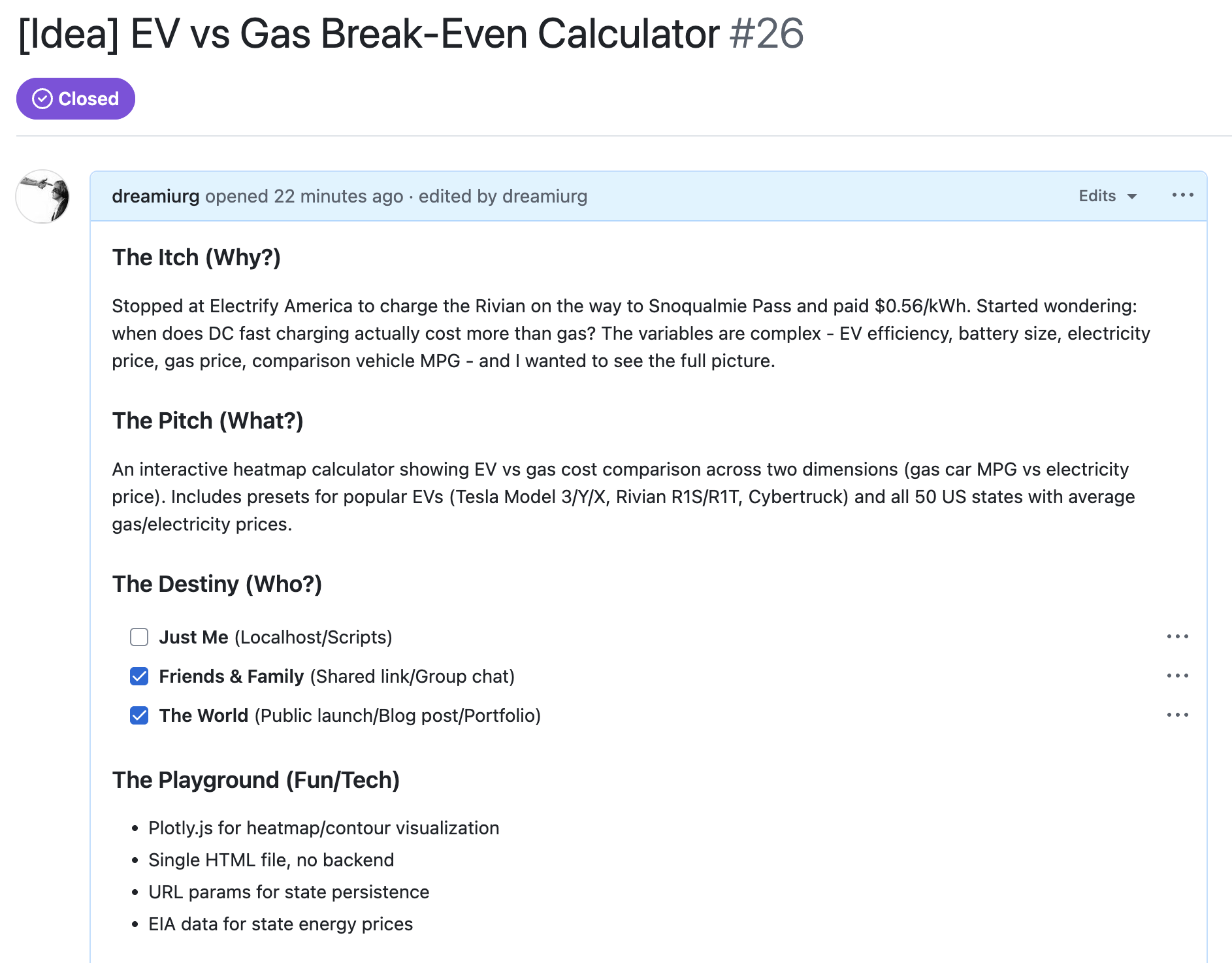
<p>I recently built <a href="/ev-gas-breakeven.html">an EV vs gas break-even calculator</a> after a conversation with my dad at a charging station. The issue looked like this:</p>

<p><img src="/images/itch-pitch-ev-calculator.png" alt="GitHub Issue showing the Itch &amp; Pitch template filled out for the EV calculator" /></p>

<p>I paid $0.56/kWh at a DC fast charger and started wondering about the break-even point compared to gas. Wanted a mental model for when EV charging is actually cheaper.</p>

<p>The “Destiny” checkboxes helped me scope it. This wasn’t just for me, I wanted to share it publicly, which meant building something polished enough for a blog post.</p>

<p>The playground section reminded me I wanted to try <a href="https://plotly.com/javascript/">Plotly.js</a> for visualization. Single HTML file, no backend.</p>

<p>90 minutes later: <a href="/ev-gas-breakeven.html">published calculator</a>, <a href="2026-01-27-ev-vs-gas-break-even-calculator.md">blog post</a>, issue closed.</p>

<h2 id="from-idea-to-blog-post">From Idea to Blog Post</h2>

<p>Open Claude Code in a new session on this repo. Tell it to file a new issue using the template. This seeds the context with the Itch &amp; Pitch structure.</p>

<p>Then I ask Claude to brainstorm using <a href="https://github.com/obra/superpowers">superpowers</a>. The brainstorming skill picks up the constraints from the issue and keeps things focused. From there I can track the work, build, ship, and publish.</p>

<p>I also leave comments on the GitHub issue as I go, notes for future enhancements, or food for thought when writing the blog post later.</p>

<h2 id="will-this-stick">Will This Stick?</h2>

<p>Honestly? I don’t know. I’ve been using this for a few weeks and it’s working well. Having ideas in one AI-accessible place feels like the right foundation. But I’ve also abandoned plenty of “systems” before.</p>

<p>What I do know: the friction between “random idea” and “thing I can actually work on” dropped significantly. And that’s worth something.</p>

<p>The template is <a href="https://gist.github.com/dreamiurg/33e78c642c707fc810267806cfdb7361">available as a gist</a> if you want to steal it.</p>

<p><em>Related: I wrote about <a href="/2026/02/02/where-the-work-goes-when-agents-arrive/">where the work actually goes</a> when you’re building with AI agents — the workflow that makes these quick builds possible.</em></p>

<p>Cheers.</p>]]></content><author><name>Dmytro Gaivoronsky</name></author><summary type="html"><![CDATA[Using GitHub Issues as an AI-friendly idea tracker for side projects. Includes an Itch & Pitch template that works with Claude Code brainstorming.]]></summary><media:thumbnail xmlns:media="http://search.yahoo.com/mrss/" url="https://dreamiurg.net/images/itch-pitch-ev-calculator.png" /><media:content medium="image" url="https://dreamiurg.net/images/itch-pitch-ev-calculator.png" xmlns:media="http://search.yahoo.com/mrss/" /></entry><entry><title type="html">Where the Work Goes When Agents Arrive</title><link href="https://dreamiurg.net/2026/02/02/where-the-work-goes-when-agents-arrive.html" rel="alternate" type="text/html" title="Where the Work Goes When Agents Arrive" /><published>2026-02-02T10:00:00-08:00</published><updated>2026-02-02T10:00:00-08:00</updated><id>https://dreamiurg.net/2026/02/02/where-the-work-goes-when-agents-arrive</id><content type="html" xml:base="https://dreamiurg.net/2026/02/02/where-the-work-goes-when-agents-arrive.html"><![CDATA[<p>A friend dropped this in our Slack the other day about Steve Yegge’s Gas Town:</p>

<blockquote>
  <p>I think Gas Town is directionally correct but you have to admit also unhinged in a bunch of ways. I can’t help but be attracted to the absolute gonzo yolo mentality that birthed it, but I wouldn’t want to live there.</p>
</blockquote>

<p>It’s been rattling around in my head since. He’s right on both counts. And I say that as someone who actually lives there.</p>

<p>The main thing I keep noticing isn’t the tools. It’s where the work goes.</p>

<p>Over the last six months living in Gas Town, the biggest shift hasn’t been speed, it’s attention. This post is about how that attention moves upstream into design and guardrails, and how the feedback loops change once you stop reading every line.</p>

<!--more-->

<h2 id="i-live-in-gas-town">I Live in Gas Town</h2>

<h3 id="what-gas-town-is">What Gas Town Is</h3>

<p>For the past six months I’ve been experimenting with <a href="https://steve-yegge.medium.com/welcome-to-gas-town-4f25ee16dd04">Gas Town</a> and other ways to orchestrate AI-driven development, both for work and personal projects. Gas Town is Yegge’s multi-agent orchestration system for Claude Code. It coordinates 20-30 agents working on tasks simultaneously. Mad Max-themed terminology: a Mayor agent you talk to, Rigs for projects, Polecats as ephemeral workers. It’s a machine for spending hundreds of dollars a day on Claude API calls while you focus on feeding it design work.</p>

<p>The pitch: agents lose context on restart, so Gas Town persists work in git-backed hooks. You tell the Mayor what you want, and it orchestrates implementation across multiple agents while you go do something else. Throughput at the speed of thought.</p>

<h3 id="why-i-live-there">Why I Live There</h3>

<p>Is it gonzo? Absolutely. Would I want to live there? I already do.</p>

<h3 id="the-trade-distance-is-the-gain">The Trade: Distance Is the Gain</h3>

<p>The trade is simple. AI-assisted coding has increased my productivity and the distance between me and the code. These aren’t separate effects. The productivity gain <em>is</em> the distance. You can’t have one without the other.</p>

<p>I no longer read every line that gets written. I don’t even read most lines. That used to bother me until I realized the work had moved.</p>

<h2 id="two-modes-of-attention">Two Modes of Attention</h2>

<p>Looking back at how I produce code now, it breaks into two distinct modes:</p>

<h3 id="autopilot-mode-70">Autopilot Mode (70%)</h3>

<p>Small features, bug fixes, routine changes. I describe what I want, Claude implements it, CI runs, it merges. I give little attention to implementation details.</p>

<p>This sounds reckless until you consider what’s actually in place. Unit tests with decent coverage. Linters catching style issues. Formatters keeping things consistent. Type checking catching obvious mistakes. CI gates preventing broken code from merging. Pre-commit hooks running <a href="https://github.com/gitleaks/gitleaks">gitleaks</a> for secrets.</p>

<p>Some of these workflows have solidified enough that I’ve codified them into Claude commands, skills, and custom prompts. Others are still experimental, patterns I use daily but haven’t formalized yet. As I notice approaches working reliably, I encode them. The codified workflows compound: each one means more work I can safely put on autopilot.</p>

<h3 id="deliberate-mode-30">Deliberate Mode (30%)</h3>

<p>New authentication systems. Terraform infrastructure. Database schema changes. Architectural decisions that will shape hundreds of subsequent changes.</p>

<p>This is where I slow down. A lot. I brainstorm with Claude before any code gets written. We discuss tradeoffs. I sketch designs. I ask Claude to poke holes in my thinking. Only then does implementation happen, and I read that code carefully before merging.</p>

<p>The goal isn’t to review every line. It’s to make sure the patterns and abstractions are right. If the foundation is solid, all the autopilot work that lands on top of it will be decent. If the foundation is broken, no amount of careful review on individual features will save you.</p>

<h3 id="failure-rate-snapshot">Failure Rate Snapshot</h3>

<p>Across both modes, failures still show up. I pulled numbers from my logs to keep myself honest. Those are below.</p>

<h2 id="a-quick-analysis">A Quick Analysis</h2>

<h3 id="numbers-from-the-logs">Numbers From the Logs</h3>

<p>After the brain dump, I looked at my own session logs for January 4, 2026 through February 3, 2026 and pulled some basic numbers. I wanted a reality check before making claims.</p>

<ul>
  <li>Sessions scanned: 1,130 total, 1,058 Claude and 72 Codex</li>
  <li>User prompts: 37,562</li>
  <li>Median session length was under a minute. P90 was around 25 minutes. P95 was about 100 minutes.</li>
  <li>Median prompts per session was 3. P90 was about 63.</li>
</ul>

<p>Failure signals showed up in about 16% of sessions. When failures happened, they were mostly CI related. About three quarters of failure prompts mentioned CI. Fewer than one in ten mentioned pre-commit. Manual review was a small slice.</p>

<h3 id="what-the-numbers-point-to">What the Numbers Point To</h3>

<p>That points to two things. The tightest feedback loop is pre-commit, and agents fix those errors quickly. The weaker loop is CI, which fires later and is less visible unless I am actively watching the pull request. I think that is where the next productivity jump is. I need an automated handoff that watches CI until merge and reacts when it breaks. That connects directly to Steve Yegge’s Gas Town merge queue and refinery idea. If I can automate that step reliably, the whole system gets smoother.</p>

<p>I’m still figuring out how to run workflows reliably. In any reasonably large project there’s a chain from inspiration to requirements to design to implementation to landing. Landing means tests, lint, CI, deploys, and the integration environment still behaving. That’s where things go sideways. A lot of my learning in the last months has been about prompting and using deterministic tools, linters, tests, CI, so agents keep moving in the right direction.</p>

<h3 id="failure-modes--the-learning-budget">Failure Modes &amp; the Learning Budget</h3>

<p>I discover new failure modes constantly. Claude gets confused by monorepos with multiple package.json files. It invents API endpoints that don’t exist. It confidently refactors code in ways that technically work but violate conventions I never explicitly stated.</p>

<p>Each failure teaches me something: a new instruction to add to <code class="language-plaintext highlighter-rouge">CLAUDE.md</code>, a test case I should’ve written, a pattern I should’ve established earlier. This is the learning budget, the cost of pushing boundaries in a space that’s still evolving rapidly.</p>

<p>I’m excited by it, and I’m not pretending I’ve figured it out. I’m sharing where I am right now, six months into living in a full-time multi-agent, herd-the-agents workflow. Gas Town is just one influence.</p>

<h2 id="feedback-loops">Feedback Loops</h2>

<h3 id="deterministic-vs-fuzzy-loops">Deterministic vs. Fuzzy Loops</h3>

<p>What actually keeps quality stable is feedback loops that build confidence.</p>

<p>Some loops are deterministic: tests, linters, type checks, CI gates, pre-commit hooks. Other loops are fuzzier: prompt constraints, checklists, review rituals, and the explicit constraints I hand to agents. The confidence comes from overlap. When multiple signals agree, I move faster. When they disagree, I slow down and tighten the loop.</p>

<p>If your loops are thin, no tests, no types, weak CI, you cannot put anything on autopilot. You end up reviewing every line because that is your only quality gate.</p>

<h3 id="what-i-want-to-measure-next">What I Want to Measure Next</h3>

<p>There is also an open question I want to dig into later: observability for these loops. I want metrics on which loop actually caught the failure.</p>

<ul>
  <li>How many times did the agent hit a unit test failure in pre-commit?</li>
  <li>How many times did CI fail a pull request because earlier stages missed it?</li>
</ul>

<p>If you have ideas here or have built something along these lines, let me know. I’m curious to learn.</p>

<h3 id="operating-loops-i-use">Operating Loops I Use</h3>

<p>The concept is concrete in the day-to-day. A few operating loops have become routine:</p>

<ul>
  <li><strong>Recon pass.</strong> I ask an agent to scan a neglected area, map what’s off, and propose a small set of changes. Sometimes it turns into a feature, often it’s just debt.</li>
  <li><strong>Targeted sweep.</strong> Pick one pattern that’s been bothering me and update it everywhere in one pass.</li>
  <li><strong>Codify the pain.</strong> If I ask for the same thing twice, I turn it into a skill or a command. If it’s deterministic, I drop to a script.</li>
  <li><strong>Guardrail tuning.</strong> When something fails, I tighten prompts or CI gates before the next run.</li>
</ul>

<p>These aren’t planned work. They’re opportunistic and show up when I have spare cycles.</p>

<p>I’ve also noticed a new loop: solve the thing, then codify it, then move on. If a task repeats twice, I start thinking about the skill or command that would make it deterministic. That impulse didn’t exist for me before. Now it shows up almost automatically.</p>

<h2 id="what-changed-for-me">What Changed for Me</h2>

<h3 id="the-new-relationship-with-the-codebase">The New Relationship with the Codebase</h3>

<p>It’s a different relationship with a codebase. Less intimate, more managerial. I know what’s there at an architectural level, but I don’t have line-by-line familiarity anymore. And I’m okay with that.</p>

<p>If anything here sticks for me, it’s where the work went: up front into design and guardrails, then back into review loops. Everything else is still moving.</p>

<h3 id="delegation-isnt-reckless-if-guardrails-exist">Delegation Isn’t Reckless (If Guardrails Exist)</h3>

<p>Gas Town does feel gonzo. But the underlying intuition, that we can trust automated systems more and human review less, isn’t actually crazy. We’ve been moving in that direction for decades. Compilers, type checkers, linters, CI pipelines, code review tools. AI agents are just the next layer.</p>

<p>Delegating to autopilot isn’t reckless if you’ve built the infrastructure to catch falls. It’s just acknowledging where the actual value of human attention lies.</p>

<hr />

<p><em>Related: I’ve written about the tools that support this workflow — <a href="/2026/01/08/claude-code-session-topics/">session topic summaries</a> for tracking parallel sessions, <a href="/2026/01/06/iphone-to-macbook-remote-claude-code-setup/">running Claude Code remotely from my phone</a>, and <a href="/2025/11/05/building-claude-code-skill-to-scratch-my-own-itch/">building my first Claude Code skill</a>. I also wrote about <a href="/2026/02/02/how-i-stopped-losing-track-of-side-project-ideas/">how I track ideas</a> for projects like these.</em></p>

<p>Cheers.</p>]]></content><author><name>Dmytro Gaivoronsky</name></author><summary type="html"><![CDATA[Six months of multi-agent AI development with Claude Code and Gas Town. How attention shifts from writing code to designing guardrails, and what the failure rates actually look like.]]></summary></entry><entry><title type="html">EV vs Gas Break-Even Calculator</title><link href="https://dreamiurg.net/2026/01/27/ev-vs-gas-break-even-calculator.html" rel="alternate" type="text/html" title="EV vs Gas Break-Even Calculator" /><published>2026-01-27T11:00:00-08:00</published><updated>2026-01-27T11:00:00-08:00</updated><id>https://dreamiurg.net/2026/01/27/ev-vs-gas-break-even-calculator</id><content type="html" xml:base="https://dreamiurg.net/2026/01/27/ev-vs-gas-break-even-calculator.html"><![CDATA[<p>Yesterday we were driving up to <a href="https://summitatsnoqualmie.com/">Snoqualmie Pass</a> to ski with the family, and I realized I’d forgotten to charge the <a href="https://rivian.com/">Rivian</a> overnight. So we had to stop in Issaquah and top up at <a href="https://www.electrifyamerica.com/">Electrify America</a>, going from about 10% to 85%. The price there was roughly $0.56/kWh, which naturally turned into a conversation with my dad about how charging a Rivian really compares to fueling a gas car.</p>

<p>We came up with some rough numbers on the spot, but I was curious what this actually looks like in perspective.</p>

<!--more-->

<h2 id="the-question">The Question</h2>

<p>The basic question is simple: when does charging an EV cost more or less than filling up a gas car for the same distance?</p>

<p>The answer depends on a bunch of variables:</p>
<ul>
  <li>Your EV’s efficiency (mi/kWh)</li>
  <li>Battery size and how much you’re charging (10% to 85% vs 20% to 80%)</li>
  <li>Electricity price (home charging at $0.12/kWh vs DC fast charging at $0.56/kWh)</li>
  <li>Gas price in your area</li>
  <li>What kind of gas car you’re comparing against (a Prius vs an F-150)</li>
</ul>

<h2 id="the-calculator">The Calculator</h2>

<p>I built <a href="/ev-gas-breakeven.html">an interactive calculator</a> that visualizes all of this.</p>

<p>The heatmap shows cost difference across two dimensions:</p>
<ul>
  <li><strong>X-axis</strong>: Gas car fuel efficiency (MPG) - from gas-guzzling trucks to hybrids</li>
  <li><strong>Y-axis</strong>: Electricity price ($/kWh) - from cheap home charging to expensive DC fast charging</li>
</ul>

<p><strong>Green</strong> means the EV is cheaper. <strong>Red</strong> means gas is cheaper. The break-even line shows where costs are equal.</p>

<h2 id="what-i-learned">What I Learned</h2>

<p>A few things became clear:</p>

<p><strong>Home charging is almost always cheaper.</strong> At typical home rates ($0.10-0.15/kWh), my Rivian R1S beats everything except the most efficient hybrids. Even comparing against a 30 MPG sedan, I’m saving money.</p>

<p><strong>DC fast charging changes the math.</strong> At $0.56/kWh (what I paid at Electrify America), my Rivian only beats gas cars getting worse than about 22 MPG. Against a typical sedan, gas is actually cheaper per mile.</p>

<p><strong>The break-even point shifts dramatically by state.</strong> In Washington, we have cheap electricity ($0.12/kWh average) but expensive gas ($4.02/gal). That’s favorable for EVs. In Texas, cheap gas ($2.45/gal) makes the comparison tighter.</p>

<h2 id="try-it">Try It</h2>

<p>The calculator has presets for common EVs (<a href="https://www.tesla.com/">Tesla</a> Model 3/Y/X, <a href="https://rivian.com/">Rivian</a> R1S/R1T, Cybertruck) and all 50 US states. Select your car and state to see your specific scenario, or adjust the sliders manually.</p>

<p><strong><a href="/ev-gas-breakeven.html">Open the calculator</a></strong></p>

<p>The state prices table at the bottom shows average gas and electricity prices across the US, with a ratio column showing which states favor EVs the most.</p>

<p><em>This calculator started as a <a href="/2026/02/02/how-i-stopped-losing-track-of-side-project-ideas/">side project idea I tracked in GitHub Issues</a> — from itch to published tool in 90 minutes.</em></p>

<h2 id="source">Source</h2>

<p>Built with <a href="https://plotly.com/javascript/">Plotly.js</a> for the heatmap visualization. Single HTML file, no backend, works offline. <a href="https://github.com/dreamiurg/dreamiurg.github.io/blob/main/ev-gas-breakeven.html">Source on GitHub</a>.</p>]]></content><author><name>Dmytro Gaivoronsky</name></author><summary type="html"><![CDATA[Interactive heatmap calculator comparing EV charging costs vs gas for any vehicle and electricity price. Presets for Tesla, Rivian, Cybertruck, and all 50 US states.]]></summary></entry><entry><title type="html">Session Topic Summaries in Claude Code Status Line</title><link href="https://dreamiurg.net/2026/01/08/claude-code-session-topics.html" rel="alternate" type="text/html" title="Session Topic Summaries in Claude Code Status Line" /><published>2026-01-08T20:15:00-08:00</published><updated>2026-01-08T20:15:00-08:00</updated><id>https://dreamiurg.net/2026/01/08/claude-code-session-topics</id><content type="html" xml:base="https://dreamiurg.net/2026/01/08/claude-code-session-topics.html"><![CDATA[<p>A couple of months ago I realized I run way too many parallel <a href="https://claude.ai/code">Claude Code</a> sessions.</p>

<p>Some are rapid-fire sessions where I’m iterating on code quickly. Others are slow burners that sit around for days while I context-switch to other work. The problem: when you come back to one of those slow sessions, you get that familiar moment of staring at the transcript thinking, <em>what was I doing here again?</em></p>

<p>Claude Code doesn’t help. There’s no at-a-glance “this session is about X” indicator. You end up scrolling up, re-reading, trying to reconstruct context like you’re debugging your own brain.</p>

<p>So I built a thing.</p>

<p><a href="/images/claude-session-topics.png" class="image-popup" title="Claude Code session topics in tmux status line">
  <img src="/images/claude-session-topics.png" alt="Claude Code session topics in tmux status line" />
</a></p>

<!--more-->

<h2 id="the-idea">The Idea</h2>

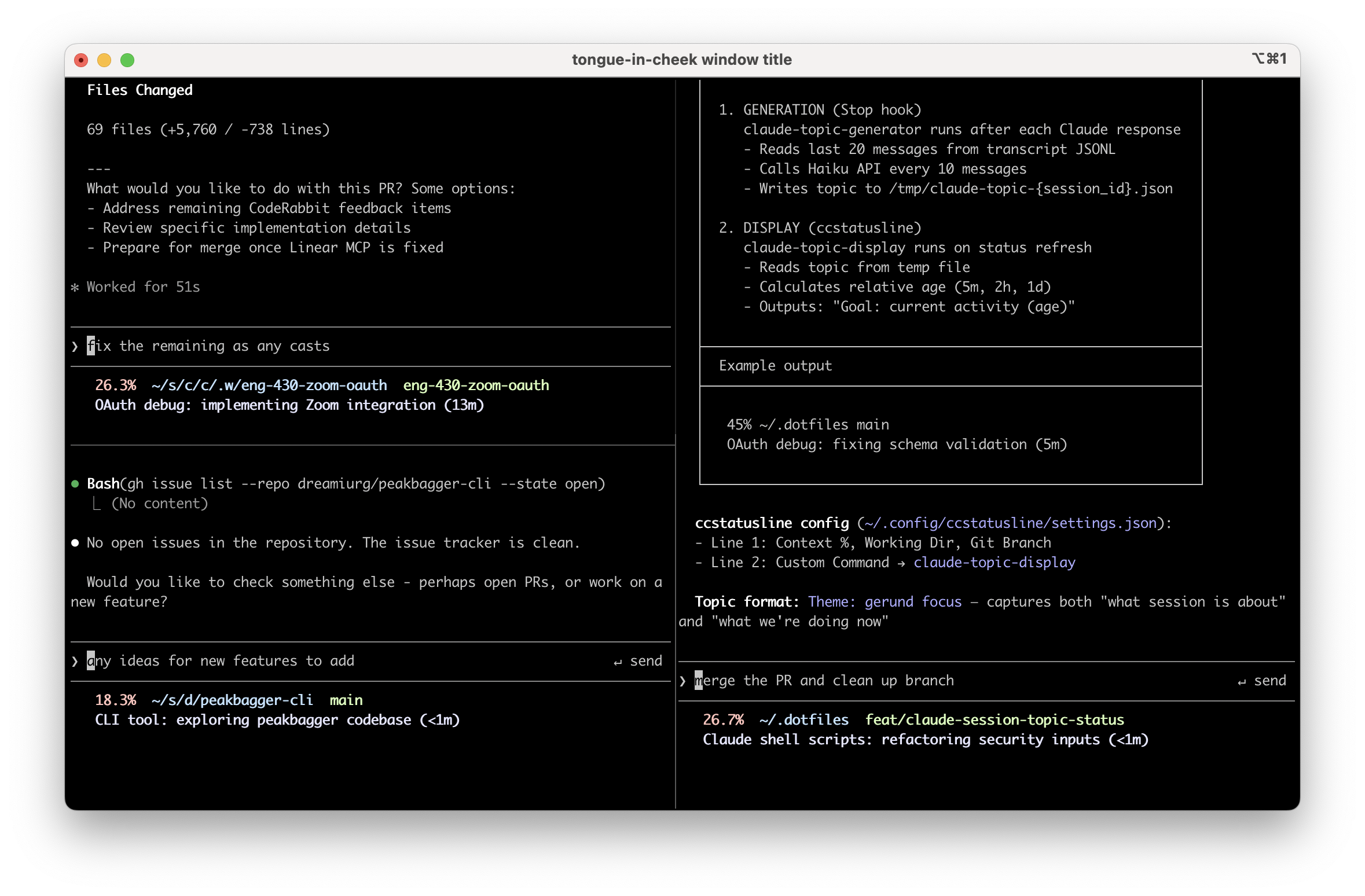
<p>Put a one-line topic summary in the status line for each session. Keep it fresh automatically. Think <a href="https://slack.com/">Slack</a> or <a href="https://discord.com/">Discord</a> channel topics, or the old <a href="https://en.wikipedia.org/wiki/IRC">IRC</a> topic line, but for Claude Code sessions.</p>

<p>Example lines:</p>

<ul>
  <li><code class="language-plaintext highlighter-rouge">OAuth debug: fixing schema validation (5m)</code></li>
  <li><code class="language-plaintext highlighter-rouge">Blog post: adding code snippets (2h)</code></li>
  <li><code class="language-plaintext highlighter-rouge">tmux config: wiring session display (&lt;1m)</code></li>
</ul>

<p>The summary has two parts:</p>

<ol>
  <li><strong>Theme</strong> - what is this session fundamentally about</li>
  <li><strong>Current focus</strong> - what we’re doing right now</li>
</ol>

<p>Plus a relative timestamp so you can see whether the summary is stale. If it says <code class="language-plaintext highlighter-rouge">(2h)</code>, it might not reflect the last few messages.</p>

<h2 id="implementation">Implementation</h2>

<p>It’s mostly glue around Claude Code’s <a href="https://github.com/anthropics/claude-code?tab=readme-ov-file#hooks">hooks system</a>:</p>

<ul>
  <li>The Stop hook fires on every message</li>
  <li>I throttle actual generation to every 10 messages, because empirically session themes stay stable across 40-50 messages while focus shifts every 8-10</li>
  <li>When the threshold hits, it spawns a background job that reads the session transcript (JSONL), extracts recent context, and calls <a href="https://docs.anthropic.com/en/docs/about-claude/models/all-models#claude-3-5-haiku">Claude Haiku</a> via the <code class="language-plaintext highlighter-rouge">claude</code> CLI</li>
  <li>The hook returns quickly (tens of ms) so Claude Code stays snappy, while summary generation happens async</li>
  <li>A lock file prevents multiple generations from running at once</li>
</ul>

<h2 id="things-i-learned">Things I Learned</h2>

<p>Along the way I discovered a few annoying but useful things.</p>

<p><strong>Summary generation can take 10-60 seconds</strong> depending on transcript size and complexity. You really don’t want it blocking the hook.</p>

<p><strong>The <code class="language-plaintext highlighter-rouge">claude</code> CLI has overhead you don’t need for this use case.</strong> Turning off session persistence with <code class="language-plaintext highlighter-rouge">--no-session-persistence</code> and disabling tools with <code class="language-plaintext highlighter-rouge">--tools ""</code> helps.</p>

<p><strong>Haiku occasionally ignores formatting instructions</strong> unless you’re very explicit. “Output ONLY the topic line” and “Do NOT output the word ‘Theme’ literally” got me to 100% format compliance.</p>

<p><strong>If you go full <code class="language-plaintext highlighter-rouge">set -euo pipefail</code> in a script that renders your status line</strong>, you’ll eventually get a useless <code class="language-plaintext highlighter-rouge">exit 1</code> in your UI instead of a fallback message. Ask me how I know.</p>

<h2 id="the-plugin">The Plugin</h2>

<p>I packaged this as <strong><a href="https://github.com/dreamiurg/claude-session-topics">claude-session-topics</a></strong>. The plugin registers the Stop hook automatically. Run <code class="language-plaintext highlighter-rouge">/setup-statusline</code> to configure your status line display.</p>

<p>Anyway, if you’re the kind of person who keeps multiple Claude Code sessions open and hates reloading context by scrolling, give it a shot. I also wrote about <a href="/2026/01/06/iphone-to-macbook-remote-claude-code-setup/">running Claude Code remotely from my phone</a> and <a href="/2025/11/05/building-claude-code-skill-to-scratch-my-own-itch/">building a daily summary skill</a>, both of which build on the same hooks system.</p>]]></content><author><name>Dmytro Gaivoronsky</name></author><summary type="html"><![CDATA[A Claude Code plugin that generates at-a-glance session topic summaries in your tmux status line. Uses hooks and Haiku to keep context visible across parallel sessions.]]></summary><media:thumbnail xmlns:media="http://search.yahoo.com/mrss/" url="https://dreamiurg.net/images/claude-session-topics.png" /><media:content medium="image" url="https://dreamiurg.net/images/claude-session-topics.png" xmlns:media="http://search.yahoo.com/mrss/" /></entry></feed>